When the office is chasing updates and the crew is buried in calls, texts, and paper forms, the real problem is not your team—it’s the process. Every manual handoff adds delay, confusion, and the classic “I thought someone else was handling it” moment. That’s where smarter field service automation earns its keep. Automated workflows help trade businesses move jobs from quote to completion without the usual admin pile-up. Schedules update in real time, crews get the right job details on site, and the office can see progress without playing phone tag all day. Photos, task lists, sign-offs, and time logs are captured as the work happens, not hours later from memory and scribbled notes. For businesses wondering how to automate field service, the answer starts with connecting the moving parts in one system. Good field service management software reduces dropped balls, speeds up invoicing, and keeps jobs rolling without micromanagement. Less paperwork. Fewer missed updates. More control, with a lot less chaos.
Where Manual Field Service Processes Break Down
Manual service processes rarely fail all at once—they fail in small, expensive ways. A job gets rescheduled but the tech never sees the update. Site notes stay in someone’s phone. A sign-off is missed, a timesheet is wrong, and invoicing gets pushed back another day. Before long, the office is chasing answers while the field is chasing the next job. That’s what happens when schedulers, technicians, and managers are stuck across spreadsheets, whiteboards, text messages, and separate apps. Duplicate data entry creeps in, communication gaps widen, and no one has a clear view of job status, crew activity, or asset availability. It’s chaos wearing a high-vis vest. For trade businesses, this is where field service workflow automation becomes an operational advantage, not just another software add-on. Automating service operations means updates flow in real time, job records stay complete, and billing can move as soon as work is done. Good field service management software doesn’t just store information—it keeps the whole business moving without the usual admin circus.
The Hidden Cost of Chasing Jobs Manually
Manual job chasing looks harmless at first—until the office is buried in calls, texts, spreadsheet updates, and “just checking” messages. Every hour spent confirming schedules, tracking paperwork, or hunting down site photos is an hour not spent quoting faster, billing sooner, or growing the business. That admin drag slows cash flow too: if job details arrive late, invoices go out late, and getting paid becomes another job in itself. The bigger problem is what slips through the cracks. Missed updates, double-booked crews, forgotten materials, and incomplete sign-offs create preventable mistakes that cost time, margin, and patience. Customers feel it when technicians arrive without the full brief, when ETAs are vague, or when no one can answer a simple status question. Good field service management software removes that chaos with better visibility, faster handovers, and clearer accountability. When jobs, updates, and responsibilities live in one place, crews stay aligned, office teams stay informed, and nobody gets away with the classic “I didn’t see the message.”
See how Intrflex fits your workflow
Book a guided demo to see quoting, scheduling, and field updates in one place.
What Automated Workflows Actually Look Like in Field Service Management
- Map every job stage from approved quote to scheduling, dispatch, site work, sign-off, and invoicing so nothing relies on memory or messy handovers.
- Use trigger-based actions to move work forward automatically when a status changes, a task is completed, or a required photo is uploaded.
- Send instant crew notifications when jobs are assigned, updated, delayed, or ready for the next step—without constant calls from the office.
- Keep calendars and timelines current by automatically updating schedules, reallocating crews, and flagging clashes as jobs shift.
- Set recurring maintenance jobs in advance so repeat work is booked on time and no service interval slips through the cracks.
- Capture GPS check-ins, site photos, and on-site sign-offs automatically to create a clear job record without extra admin.
- Connect job activity with CRM records, timesheets, and asset or fleet tracking so the whole operation stays in sync from one system.
- Trigger reminders for approvals, overdue tasks, missing paperwork, and upcoming service visits before they become costly delays.
- Automate job handoffs between office staff, field crews, and accounts so updates flow cleanly from dispatch to invoice.
- Choose field service automation that reduces admin and improves visibility—without turning management into micromanagement.
High-Impact Workflow Automations for Trade Businesses
The biggest gains usually come from automating the moments where jobs move from one stage to the next. Start with the handoffs that waste the most time or create the most confusion. When an approved quote instantly becomes a live job, your office team avoids double entry, crews get moving faster, and nothing mysteriously “falls through the cracks” while everyone swears they sent the email. Next, automate technician alerts. As soon as a job is assigned, updated, or rescheduled, the right person should get the right notification with the right details. That kind of field service automation cuts phone tag, reduces missed appointments, and keeps the office from playing full-time traffic controller. Finally, make close-out non-negotiable. Require photos, notes, customer sign-off, and a completed checklist before an invoice can be sent. This is one of the smartest examples of field service workflow automation because it protects quality, speeds billing, and gives managers real visibility without micromanaging the crew.
Manual vs Automated Field Service Operations
| Process area | Manual workflow | Automated workflow | Business impact |
| Scheduling | Jobs assigned by calls, texts, or whiteboards; changes are slow and easy to miss | Drag-and-drop scheduling with live updates, crew visibility, and route-aware planning in field service management software | Faster dispatch, fewer errors, better visibility, and easier scale across more crews |
| Field communication | Office and site rely on phone chains, scattered messages, and ad hoc check-ins | Mobile updates, photos, task lists, and sign-offs keep everyone aligned in real time | Stronger accountability, less rework, and more consistent execution without micromanagement |
| Job documentation | Notes, images, and approvals sit in paper forms or separate apps, making records incomplete | Job details, site photos, status updates, and customer sign-off are captured in one workflow | Higher accuracy, clearer audit trails, and quicker handover from field to office |
| Invoicing and timesheets | Hours, materials, and completed work are re-entered later, delaying billing and payroll | Time logs, job progress, and billable items flow straight into invoices and payroll-ready records through field service automation | Faster cash flow, fewer admin hours, and reduced disputes over labour and job status |
| Reporting | Managers chase spreadsheets for performance, job status, and cost tracking | Live dashboards and standardised reports show workload, profitability, and team output across every job | Better decision-making, stronger control, and a practical path to scalable field service workflow automation |
A Simple Workflow View of an Automated Job Lifecycle
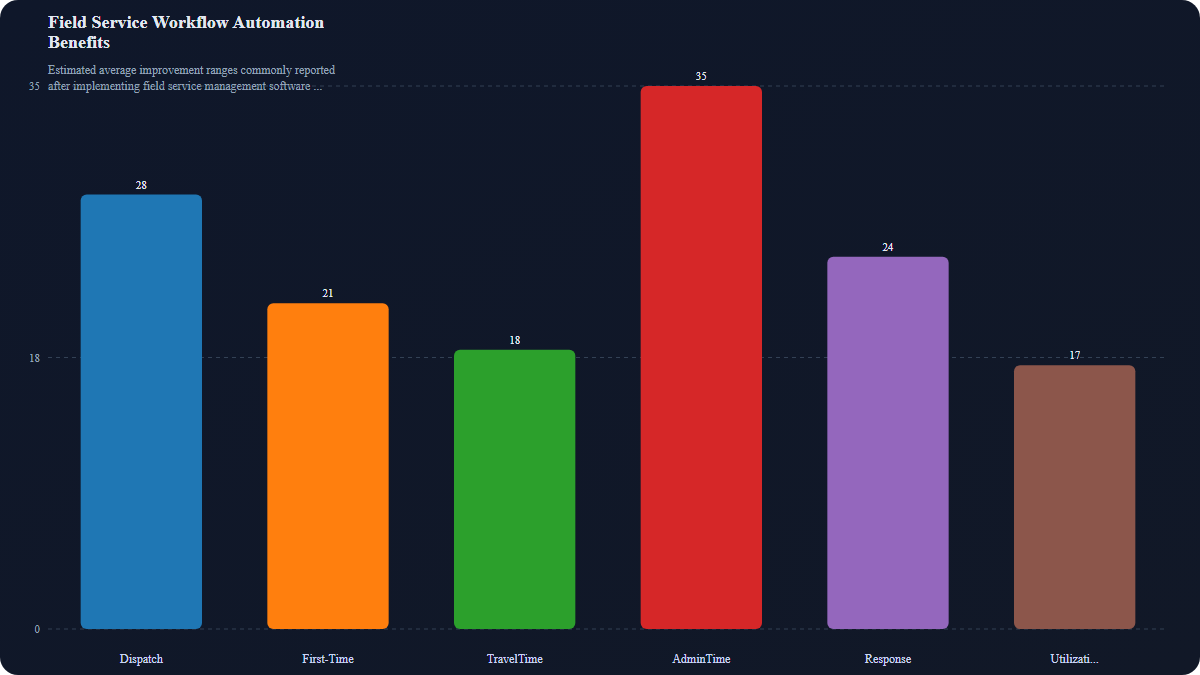
The strongest automated workflows do more than shave a few minutes off admin. They connect the entire job lifecycle, from the first quote in the office to the final sign-off on site, so nothing gets lost between teams, tools, or text messages. That is where real field service automation earns its keep: fewer delays, clearer accountability, and jobs that keep moving without someone chasing every update like a full-time detective. For trade businesses that want to grow without turning daily operations into organised chaos, the real question is not whether to automate. It is how to automate field service in a way that actually matches the way crews, schedulers, and managers work in the real world. The smartest next step is to look beyond the sales pitch and see how an all-in-one field service management software platform handles scheduling, communication, photos, timesheets, and invoicing as one connected workflow. If the system cannot manage the messy middle, it is not built for the job.
You might also like
Why Trade Businesses Use a Field Service System: The Real Benefits for Jobs, Crews, and Cash Flow
Discover why trade businesses use field service management software to improve scheduling, reduce admin, keep crews aligned, and get invoice...
 Martin Beardmore
• 12 min read
Martin Beardmore
• 12 min read
How to Start a Cleaning Business: Set Up, Jobs, Invoicing and More
Learn the key steps to launch a successful cleaning business. Get practical tips and insights to navigate challenges effectively. Read the g...
 Lewis Campton
• 15 min read
Lewis Campton
• 15 min read
How to Start a Contracting Business in the Trades
Want to go out on your own? Here’s how to start a contracting business in the UK, register with Companies House, and keep cash flow steady.
Martin Beardmore
• 16 min read