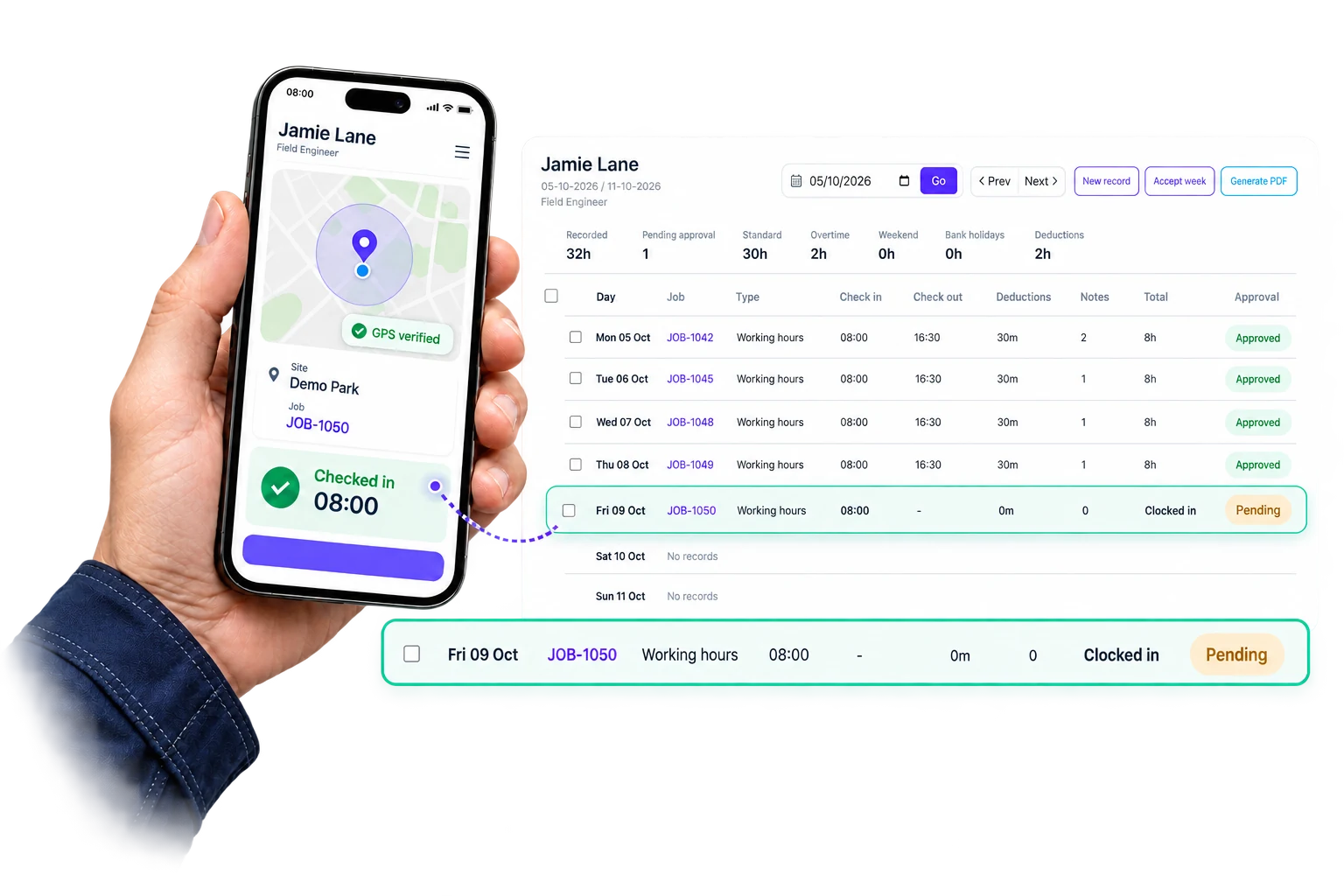
Time tracking for teams that move job to job.
When people move between sites, vans, and jobs, Intrflex keeps every entry tied to where work happened, what it belongs to, and who approved it so office, supervisors, and payroll work from the same record.
Connect recorded hours with job management and keep customer documents together with quoting and invoicing.
Why teams replace manual timesheets
GPS + site radius
Verified start and finish context
Job-linked time
Hours linked before approval
Rules, notes, edits
Payroll-ready review trail
Built for field teams, supervisors, and payroll
GPS timesheets for field teams.
Record hours against a job, review deductions and changes, then approve totals before preparing payroll.
GPS check-ins
Capture live location at the point of clock-in.
Shift duration
Keep the shift running between clock-in and clock-out.
Radius checks
Check clock-in location against configured job sites and company bases.
Job allocation
Attach hours to the correct job.
Timezone support
Normalize times for teams working across regions.
Time deductions
Review recorded deductions alongside shift totals.
Review timesheets with the context you need.
Review recorded locations, job assignments, deductions, and approval history together before preparing payroll.
Clock-in context
GPS
Recorded location
Hours allocation
Jobs
Linked work records
Timesheet review
Approval
Reviewer and date
Shift totals
Deductions
Visible adjustments
Recorded time and review context for field teams
Keep attendance, rules, and approvals moving.
The most useful time-tracking systems do more than capture hours. They help supervisors keep the day accurate before issues pile up at the end of the week.
See who is active
Live entries show who is on site, who is still clocked in, and where coverage may be missing.
Prompt the right location
GPS and site-radius checks help crews start shifts in the right place and against the right work.
Apply payroll rules consistently
Deductions and timezone handling stay attached to the same record instead of being fixed later.
Keep approvals moving
Supervisors can review missing context, manual changes, and flagged entries before sign-off becomes a bottleneck.
Close the period cleanly
Payroll receives approved totals that already carry the right job, notes, and audit context.
Review job-linked hours before payroll.
We will walk through GPS check-ins, job-linked hours, approvals, and payroll export using the way your team actually works.
Book a time tracking demo
20 minutes. Built around your field workflow.
After you submit, we arrange your demo and walk through your workflow. We agree setup and training with you based on your team and data.
What the demo will cover
- On-site proof: See how GPS check-ins and site-radius matching confirm where shifts start.
- Job-linked hours: Follow time into the right job before approval.
- Payroll review: Review deductions, notes, and adjustments in one place.
- Clean export: See how approved totals and deductions are reviewed before preparing payroll.
- 50% discount for 3 months: Book a demo and lock in your exclusive discount.
From arrival to approval, every step stays connected.
The timeline shows what happened on site, where the time went, and what was reviewed before payroll.
Clock-in
Arrival verified
GPS confirmedAllocation
Hours routed to the right work
AssignedJob
1542 · Eastgate
Phase 2 fit-out
Cost code
Labour
Auto applied
Breaks
Break policy applied
AppliedNotes
Job context preserved
LoggedClock-out
Shift ready for sign-off
ReadySet the rules once, keep timesheets consistent.
Intrflex gives teams one place to control how time is treated before approval, so the process stays consistent across sites, supervisors, and payroll periods.
- 1 Keep deductions and timezone handling attached to the entry itself.
- 2 Make job allocation part of the same workflow as the clock-in.
- 3 Keep manual edits and approval decisions visible with an audit trail.
- 4 Give payroll a cleaner period-end handoff without rebuilding the week in spreadsheets.
Policy controls
Timesheet rules
Shift totals normalized before review
Consistent treatment across teams and supervisors
Deductions remain visible in the same record
Recorded deductions remain visible for review
Approvals and manual edits stay visible
Supervisors and payroll can see what changed and why
GPS clock-in bases
3 of 5 configured
Head office
Manchester · coordinates confirmed
Leeds depot
Leeds · coordinates confirmed
Sheffield yard
Sheffield · coordinates confirmed
Clock in from any of your regular sites.
Add your depots, yards, and satellite offices as named clock-in bases so radius checks work wherever your team starts the day, not just from the main company address.
- 1 Keep the main company address as the primary clock-in base.
- 2 Add up to five extra bases on Standard, or unlimited on Professional.
- 3 Each base uses address-finder autocomplete to confirm GPS coordinates.
- 4 Radius checks run against every configured base automatically at clock-in.
Each team sees the part of time tracking they need.
Crews record time against jobs, managers review entries, and payroll can use approved totals.
Office
Review what changed
See location, notes, and policy-applied deductions in one view.
- • Approval queue
- • Entry context
- • Exception review
Field
Clock in without admin
Start shifts quickly and keep hours tied to the work being done.
- • Fast check-in
- • Job selection
- • Notes and photos
Payroll
Prepare payroll totals
Receive approved totals with rules already applied and audit history intact.
- • Clean exports
- • Rule-applied totals
- • Adjustment trail
Control who sees, edits, and exports time.
Sensitive pay and location data stays restricted to the people responsible for review and payroll.
Granular permissions
Control who can edit, approve, or export timesheets.
Automatic backups
Time history is protected by routine backups.
Secure data storage
Location, pay, and approval data stay protected end to end.
Activity visibility
Track changes and sign-off history for accountability.
Time tracking, explained.
Quick answers to the questions teams ask when replacing manual timesheets.
How do teams prove a clock-in happened on site? + -
Clock-ins can capture live GPS location and radius checks so supervisors can confirm the shift started at the right site.
Can timesheets be linked to jobs? + -
Yes. Intrflex can link hours to the correct job before approval.
What happens before payroll export? + -
Approvers can review totals, breaks, notes, and adjustments before sending timesheets on to payroll.
Do you support multiple time zones? + -
Yes. Timezone handling keeps entries consistent for teams working across regions.
Can managers see when an entry was changed? + -
Yes. Manual edits and approvals are logged with an audit trail so changes stay visible.
Review job-linked hours before payroll.
Book a demo to walk through clock-ins, approvals, and export with your workflow.