Plan the shop fit-out.
Keep installation on schedule.
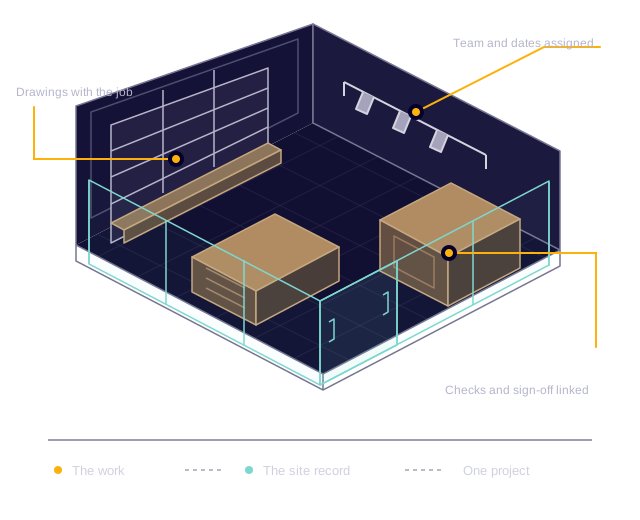
As a shop-fitting contractor, you need joinery, electrical work, flooring and finishes ready for the same retail opening. Create jobs for each stage of the store fit-out, assign your installation teams and dates, and group the work under one project. When shopping-centre access changes or fixture installation runs over, review the remaining bookings with the latest site information in front of you.
| Unit 12 / final week | Mon 20 | Tue 21 | Wed 22 | Thu 23 | Fri 24 |
|---|---|---|---|---|---|
| Electrical checks | Site checks | ||||
| Display joinery | Install counters and shelving | ||||
| Flooring and finishes | Flooring team | ||||
| Snagging | Walkthrough | Close out | |||
| Client handover | Sign-off | ||||
Illustrative programme. Plan jobs and team assignments around your own stages and dates.
Your shop fitters open assigned jobs on mobile to find the store contact, delivery restrictions, fixture drawings and installation notes. They add progress photos and updates to the same job, so your office can follow the fit-out without interrupting the team.
For a retailer's rollout, keep each store as a separate project with its own jobs, files and budget. Coordinate installations across locations while keeping each unit's layout, access arrangements and client requirements distinct.
Retail site details,
ready for your shop fitters.
Keep store measurements, fixture layouts, finish specifications and retailer instructions with the installation job. Your team can find the site brief, record changes and prepare the handover without searching separate messages. Build digital forms around your shop surveys, installation checks and completion process.
Survey, access and the agreed scopeGive the next team a usable site brief.
- Site measurements, photographs and existing conditions
- Drawings, specifications and client requirements
- Delivery windows, loading restrictions and access hours
- Site contacts and out-of-hours arrangements
- Accepted quotes and separately agreed variations
Installation and progressKeep the daily record with the work.
- Job notes and progress photographs from the mobile app
- Trade assignments, dates and outstanding tasks
- Installation checklists and supporting files
- Time recorded against the job
- Material usage, purchasing and additional expenses
Snags and remedial workMake the problem and the next action clear.
- Defect descriptions and close-up photographs
- Location and the affected fixture or finish
- Follow-up tasks with an owner and due date
- Rectification notes and completion evidence
- Inspection results and recorded sign-off
Completion and handoverKeep the evidence ready for the client.
- Completed installation and handover forms
- Supervisor and client signatures captured on forms
- Final photographs and supporting test documents
- As-built drawings, product information and warranties
- Completion documents and the final invoice
Close the snags.
Hand over a finished store.
A damaged display panel, an uneven counter or an unfinished trim needs a clear follow-up before the retailer's walkthrough. Record the issue against the installation job, assign the fix and keep the rectification photos together, so your office can check what is ready for handover.
Issue recorded
Show the fitter what needs fixing.
Add a close-up photo, describe the misaligned panel and identify the counter. Keep the issue with the installation job so the location and context stay attached.
Follow-up task assigned
Give the action to the right person.
Create a task for the joinery lead with a due date before the client walkthrough. The task makes ownership visible while the job keeps the original issue and evidence.
Rectification recorded
Keep proof of the finished work.
The fitter adds the completion photo and closes the task. Record the supervisor's check on the job form and resolve the issue, leaving the evidence available for handover.
Illustrative process using job issues, assigned tasks and digital forms. Select a step to follow the snag through to close-out.
Know what each
retail fit-out costs.
Set a budget for each store and review installation labour, materials, purchase orders, accommodation and extra costs across its jobs. Approved timesheets connect your fitters' hours to the work, helping your office see the cost of delivery before the fit-out is finished.
- Project budget
- £48,000
- Labour
- £9,200
- Materials and extras
- £19,700
- Budget remaining
- £19,100
Illustrative project figures. Costs come from the records your team adds and approves.
When the client changes a finish or adds fixtures, quote the extra work separately and record the decision. Keep agreed scope changes visible to the office, then raise invoices and staged payments against the work without rebuilding the customer and site details.
From completed fit-out
to client handover.
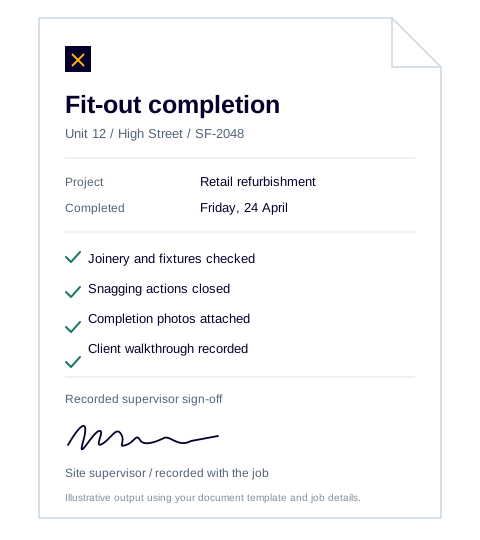
Use digital forms to check installed fixtures, record the retailer's snagging walkthrough and capture completion sign-off. Collect answers, files and signatures on mobile and keep each submission with the shop-fitting job, alongside installation photographs and supporting documents.
Configure workflows to use a completed job or submitted form as a trigger, create a PDF from your document template and send it to the selected recipients. Your team sets the checks and approvals the process needs.
The result is a consistent route from the work on site to the paperwork your client receives, with the evidence available for questions after opening day.
Explore workflow automationQuestions from shop-fitting businesses.
Who is Intrflex shop fitting software for?
Shop-fitting contractors and installation businesses delivering retail interiors, store refurbishments, display installations and multi-site rollouts. Coordinate the people and jobs involved in each shop fit-out, with site records, costs and handover information connected to the store project.
Can we manage several fit-outs at the same time?
Yes. Group the jobs for each fit-out under a separate project. Each project brings together its jobs, dates, budget, updates and attachments, so you can review a store refurbishment on its own while managing other sites in the same system.
What can our fitters do from site?
Team members can view assigned jobs and supporting information, add notes and photos, record time and complete digital forms through the Intrflex mobile app. Updates stay connected to the job for the office to review.
Can we use our own survey and handover checklists?
Yes. Build forms with the questions your team needs, including measurements, choices, dates, file uploads and signatures. Assign forms to jobs and keep completed submissions linked to the work.
How do we handle changes to the programme?
Update the job dates and team assignments, then review the remaining bookings alongside the latest site notes and progress photos. Related jobs stay grouped under the project, giving the office the context it needs to plan the next visit.
See Intrflex at work
for your shop-fitting business.
Walk through a retail fit-out, from assigning your installation teams and sharing fixture drawings to recording snags, tracking costs and handing the store over to your client.