For a lot of trade businesses, the problem isn’t just admin overload—it’s the chaos that comes from running jobs through phone calls, text chains, whiteboards, and “someone wrote it down somewhere.” That disconnect costs time, creates avoidable mistakes, and makes cash flow harder to predict. A good field service management software platform brings everything into one place, so office staff and crews can see the same schedule, job details, updates, photos, and sign-offs in real time.The benefits go well beyond being organised. Jobs get booked faster, crews arrive with the right information, and managers spend less time chasing people for status updates like a detective with a clipboard. Quotes, timesheets, invoices, and customer records stay connected, which means less double-handling and fewer delays getting paid. For growing trade businesses, that visibility is what makes scaling possible. If you’re wondering why you should use field service software, the short answer is simple: it keeps jobs moving, teams aligned, and revenue flowing.
What a field service system actually improves day to day
- Cuts admin by keeping quotes, jobs, schedules, site notes, photos, and invoices in one place instead of scattered across calls, texts, and spreadsheets.
- Reduces communication gaps with real-time updates from the field, so the office, supervisors, and crews all see the same job status without chasing people down.
- Improves scheduling and dispatch by giving teams a clearer view of who is available, where they are, and what needs to happen next.
- Speeds up on-site workflows with task lists, photo capture, notes, and sign-offs completed as the job happens—not hours later on paperwork.
- Stops duplicate data entry by carrying job details from quote to schedule to invoice, which means fewer mistakes and less rework.
- Makes invoicing faster because completed work, labour, and job notes are already captured, helping businesses get bills out sooner and improve cash flow.
- Gives managers stronger day-to-day visibility into progress, delays, and crew activity, without needing to micromanage every moving part.
- Helps solve common trade business bottlenecks like missed updates, unclear ownership, paperwork delays, and crews arriving without the right information.
- Supports better coordination between office and field teams, which is one of the biggest practical benefits of using field service software in growing trade businesses.
- Keeps the focus on running profitable jobs instead of becoming a full-time spreadsheet archaeologist trying to piece together what happened on site.
See how Intrflex fits your workflow
Book a guided demo to see quoting, scheduling, and field updates in one place.
From reactive chaos to controlled operations
Running jobs with phone calls, whiteboards, scattered texts, and “did anyone tell the crew?” energy might feel normal in the trades—but it’s also how small issues turn into full-blown daily chaos. When scheduling, updates, site notes, and paperwork live in different places, the office ends up chasing answers while field teams work with incomplete information.A centralised system changes that fast. With field service management software, everyone works from the same live job information: schedules, task lists, photos, customer details, progress updates, and sign-offs all in one place. The office can see what’s happening without ringing the crew every 10 minutes, and teams on site know exactly what’s been assigned, changed, or completed.That’s one of the biggest field service software benefits: less firefighting, fewer crossed wires, and better control without hovering over every job. Instead of reacting to problems after they blow up, managers get real visibility to keep work moving, crews accountable, and operations running a whole lot smoother.
The biggest wins for office staff and mobile crews
For office teams, the gains show up fast: scheduling becomes quicker, job changes are easier to communicate, and the endless “where is everyone?” phone calls start to disappear. With everything tied to one system, records stay cleaner too—job notes, customer details, invoices, and timesheets are all in the right place instead of hiding in texts, clipboards, or someone’s memory after a long day.For crews in the field, the work is simply clearer. They can see what needs doing, capture photos, add notes, collect sign-offs, and update progress without the usual back-and-forth with the office. That means fewer misunderstandings, less duplicated effort, and less time playing detective on site.For managers, this is where the real control kicks in. A good field service management software setup gives visibility into job progress, team performance, and timelines as work happens—not three days later when the paperwork finally lands. That’s one of the biggest field service software benefits: less chasing, more confidence, and jobs that actually stay on track.
Where the ROI shows up fastest in a trade business
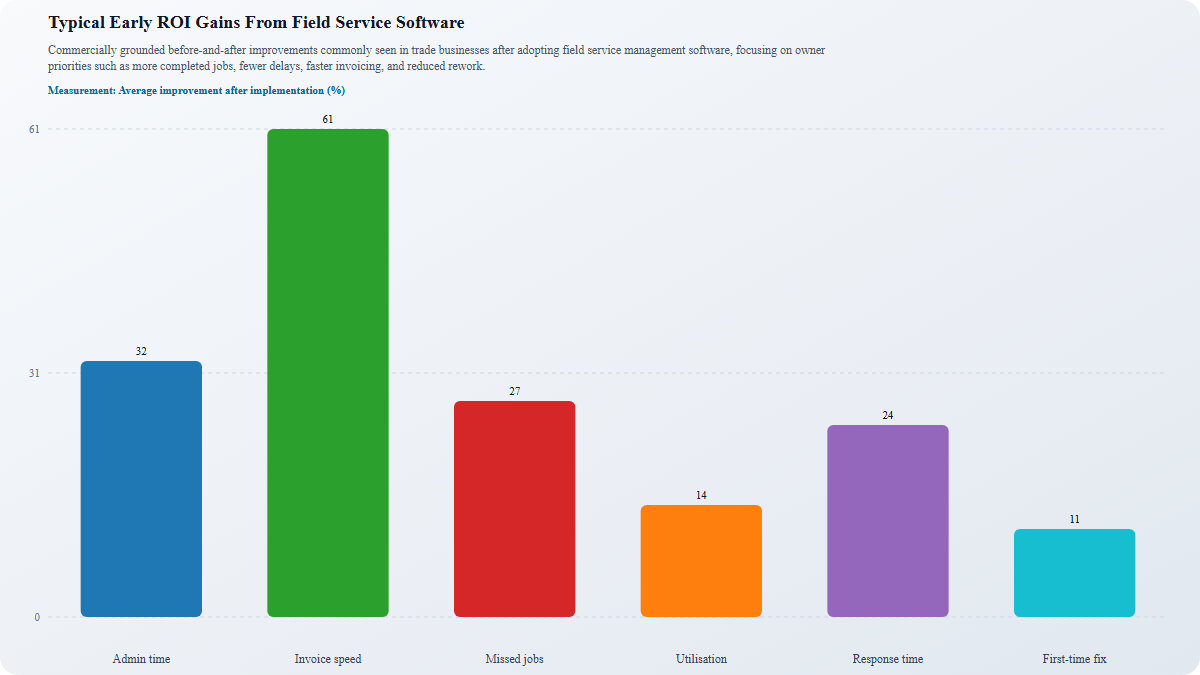
Measurement: Average improvement after implementation (%)
The cost of sticking with manual systems
Manual systems rarely look expensive on paper, but they leak money everywhere else. Teams waste hours double-handling the same info across notebooks, spreadsheets, texts, and invoices. Jobs get scheduled twice, the wrong crew gets sent, approvals sit in someone’s inbox, and small extras on site never make it onto the final bill. That is margin slipping quietly out the door.The bigger problem is the knock-on effect. When office staff and field crews are working from different versions of the truth, delays pile up, customers get vague updates, and urgent jobs turn into avoidable firefights. A missed photo, unsigned form, or forgotten timesheet can slow billing, create disputes, and make cash flow wobble.That is exactly why to use field service software becomes less of a tech question and more of a business one. Good field service management software helps remove these hidden costs, improve visibility, and protect customer experience. In other words, doing nothing is not the budget option, it is usually the most expensive one.
What to look for when choosing software that actually helps
| What to compare | Disconnected tools | All-in-one FSM system |
| Job flow and scheduling | Separate apps, manual handoffs, limited calendar visibility | One workflow for quoting, scheduling, live job status, and team coordination |
| Field and office updates | Calls, texts, and missing notes create gaps between site and admin | Mobile updates, photos, task lists, and sign-offs keep everyone aligned in real time |
| Operations coverage | Quotes, invoicing, timesheets, CRM, and asset records live in different places | End-to-end job control in one simple, ready-to-go system with shared visibility across teams |
| Rollout and fit | More features on paper, but slower setup and weaker adoption | Easier rollout, clearer workflows, and support that fits how trade teams actually work |
| Buying decision | Buyers may start with nearby software providers, then compare price only | Shortlist tools that match your jobs, team size, support needs, and real field service software benefits |
Questions buyers should ask before booking a demo
Before booking a demo, buyers should pressure-test whether the software will actually work in the real world, not just look tidy on a sales screen. Start with the big one: will field crews use it on site without eye-rolling, workarounds, or a dozen training sessions? If the mobile experience is clunky, adoption drops fast and the office ends up back on the phone chasing updates anyway.Next, ask whether managers and admins can see live job status as work happens. Good field service management software should show progress, photos, notes, sign-offs, and schedule changes in real time, so no one has to play detective at 4:45 pm.It’s also worth checking whether scheduling, field activity, and invoicing sit in one connected workflow. If teams still need to jump between apps, admin sneaks right back in. Finally, ask how quickly the business can get started. The best field service software benefits show up early: less chaos, fewer missed details, and jobs moving from quote to completion without the usual circus.
See the benefits in one connected workflow
Create a branded workflow visual showing the full trade job lifecycle in one system Suggested image flow: quote accepted → job scheduled → crew dispatched → on-site updates/photos/tasks → sign-off → invoice sent → performance tracked Use Intrflex Purple and Bright Purple accents with ATTENTION GRABBING TEXT for the biggest benefit callouts Avoid generic smiling-hardhat stock imagery; prefer a clean dashboard-meets-field-work illustration or annotated UI-style diagram Show how one app reduces handoff friction between office staff, field crews, and managers
At the end of the day, the real win is not just shaving minutes off admin. It is gaining control without the usual chaos of phone calls, missed updates, scribbled notes, and “who was meant to do that?” moments. Good field service management software gives trade businesses a clearer view of every job, crew, asset, and deadline, so work keeps moving without constant chasing or micromanaging.That is why the biggest field service software benefits often show up in the flow of the business: smoother scheduling, faster communication, better accountability, and fewer surprises on site. If you are weighing up why to use field service software, the answer is simple: it helps your team stay organised, responsive, and profitable as jobs scale.If you are comparing platforms, look beyond feature lists and focus on fit. See how the system handles your real workflow. And if you want a simple, ready-to-go option built for trade teams, book a demo with Intrflex and see how it can work in the field and in the office.
You might also like
How to Start a Contracting Business in the Trades
Want to go out on your own? Here’s how to start a contracting business in the UK, register with Companies House, and keep cash flow steady.
 Martin Beardmore
• 16 min read
Martin Beardmore
• 16 min read
How to Calculate a Call Out Fee For Any Job
Not sure how to calculate a call out fee? Break down costs, profit, and timing to price every job fairly without undercharging or losing cus...
 Lewis Campton
• 17 min read
Lewis Campton
• 17 min read
How to Start a Cleaning Business: Set Up, Jobs, Invoicing and More
Learn the key steps to launch a successful cleaning business. Get practical tips and insights to navigate challenges effectively. Read the g...
Lewis Campton
• 15 min read