Using one app for quoting, another for scheduling, a separate chat tool, a spreadsheet for timesheets, and something else for invoices might feel normal. But once your team is bouncing between tabs all day, the cracks start showing. Jobs get delayed because updates live in the wrong place, crews miss changes, and the office ends up playing detective instead of getting work out the door.The real problem with too many business apps isn’t just the cost of subscriptions. It’s the admin drag, double handling, and lack of clear visibility across every job. When your systems don’t talk to each other, small mistakes turn into call-backs, missed appointments, and frustrated staff.That’s where business process consolidation starts making sense. A simple all-in-one business app gives your office and field crews one shared source of truth for schedules, job notes, photos, task lists, and invoicing. Less app-hopping, fewer crossed wires, and a lot less “wait, who updated that?” energy.
The hidden cost of running jobs across too many tools
When your quotes live in one app, the schedule sits in another, the crew chats in a group thread, and invoices happen somewhere else entirely, jobs start slipping through the cracks. It might feel manageable at first, but for plumbers, HVAC teams, cleaners, builders, and other mobile crews, too many business apps quickly turn into daily friction.Office staff end up copying the same details from system to system, chasing approvals, and trying to figure out which version of the job is actually right. Out on site, crews miss updates, photos get buried, job notes end up scattered, and nobody is fully sure who ticked off what. That is when delays, rework, and awkward “I thought someone else did it” moments start costing real money.This is why business process consolidation matters. You do not need a complicated tech stack to run trade jobs well. An all-in-one business app keeps scheduling, job info, field updates, and invoicing connected, so the whole team can work from the same playbook without the admin circus.
Where the cracks show up first
- Quote details should flow straight into the scheduled job so nothing gets missed on site.
- Match crew calendars with timesheets in one place so you can see who is actually available.
- Keep photos, sign-offs, and task updates attached to the job instead of buried in chat.
- Make field updates part of the workflow so invoicing is not stuck waiting on missing info.
- Use real-time job notes to stop office and site teams from working off different versions.
- Cut down on too many business apps by keeping scheduling, job updates, and admin connected.
- Give crews a simple mobile view of what needs doing, what changed, and what is done.
- Centralise job records from quote to invoice to reduce admin and keep work moving.
See how Intrflex fits your workflow
Book a guided demo to see quoting, scheduling, and field updates in one place.
Why this gets worse as you grow
Growth is great—until the cracks in your workflow start growing too. A small team can usually get away with a few texts, a spreadsheet, and someone “just remembering” what’s happening. Add more staff, more vehicles, and more jobs, and suddenly every handoff becomes a chance for details to go missing. One crew misses a note, the office chases updates, and now a simple job turns into a full-blown admin scavenger hunt.As job volume increases, even tiny delays get expensive. A quote that sits too long, a schedule change nobody sees, or paperwork that waits until the end of the day can create bottlenecks across the whole business. That’s where too many business apps make things worse, not better—your team spends more time switching tools than getting work done.And when managers can’t see what’s happening in real time, they do what managers do: start checking in on everything. Constant calls, constant follow-ups, constant “just making sure.” It’s not control—it’s survival mode. An all-in-one business app helps cut the guesswork so teams can stay on track without being micromanaged.
How fragmented systems slow scheduling, communication, and cash flow
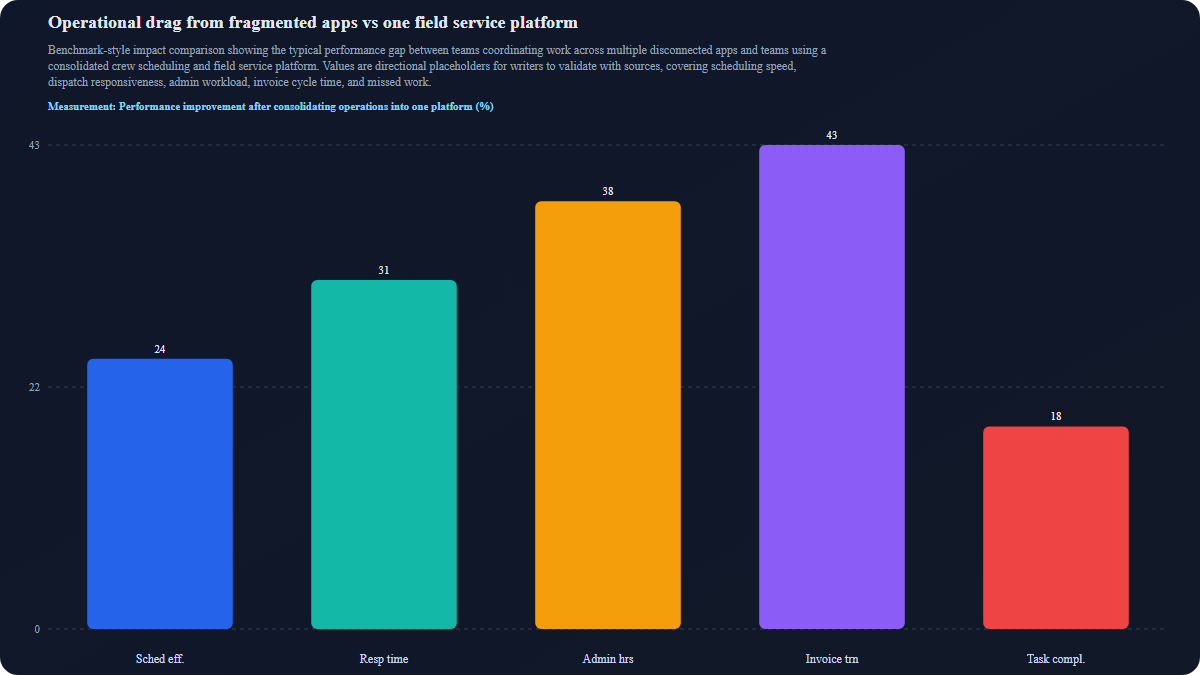
What to look for instead of another app add-on
| Criteria | Fragmented stack with app add-ons | Connected field service platform |
| Job creation and crew scheduling | Jobs get created in one tool and pasted into a crew scheduling app, so handoffs pile up | Create jobs and schedule crews in one place with real-time visibility |
| Field updates and sign-offs | Photos, notes, and task updates live across chats, forms, and inboxes | Field teams update jobs on site with photos, checklists, and sign-offs in the same system |
| Quotes, invoicing, and timesheets | Quoting, invoicing, and time logging sit in separate apps, which means more admin and double-handling | Quotes, invoices, and timesheets flow together in one all-in-one business app |
| CRM, asset tracking, and reporting | Customer info, service history, and assets are scattered, so reporting feels like a treasure map | CRM, asset tracking, and reporting stay connected for clearer decisions and less chasing |
Questions to ask before consolidating your tech stack
- List the jobs your team handles in more than one app—quoting, scheduling, updates, invoices, or timesheets—and flag the overlap.
- Spot the handoff gaps between office and field: where do calls, texts, or missed notes slow a job down?
- Decide what needs live visibility, like job status, crew location, photos, sign-offs, or schedule changes.
- Separate must-have tools from old habits—keep what the team truly relies on, not what’s just always been there.
- Check whether your crew can do the work from one mobile-friendly system instead of bouncing between too many business apps.
- Ask which admin tasks could disappear if your processes were consolidated into one place.
- Look for places where double entry creates errors, delays, or awkward follow-up.
- Review whether scheduling, job notes, and field updates are connected enough to keep crews moving without constant check-ins.
- Test each tool against one simple question: does it help finish jobs faster, or just add another layer to manage?
A simpler field workflow your team will actually use
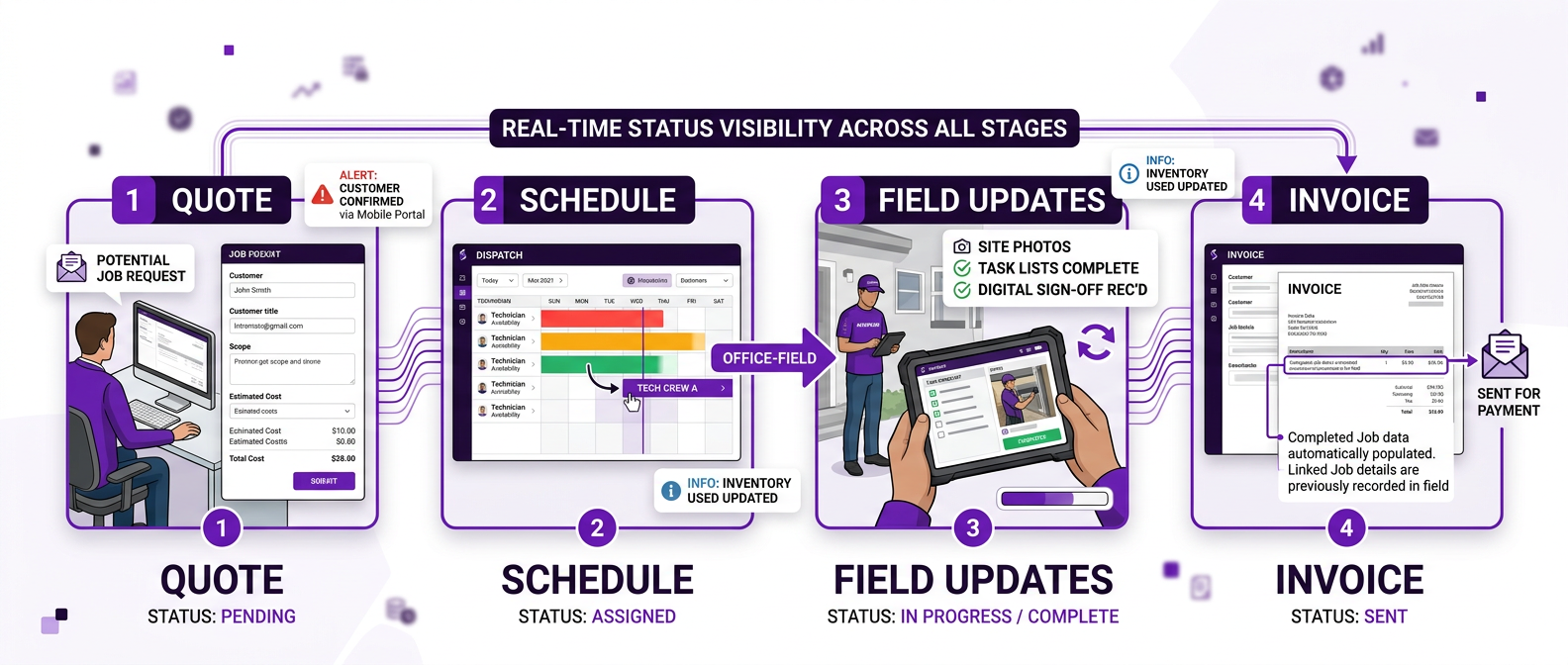
Image concept: clean workflow diagram showing one job moving from quote to schedule to field updates to invoice inside a single connected system Highlight office-to-field visibility with real-time status, photos, task lists, sign-offs, and calendar coordination Use Intrflex-aligned visual direction: bold purple palette, dark text contrast, modern trade-operations feel, no generic handshake stock imagery Show mobile crews and office staff connected through one source of truth Support the idea of business process consolidation with a practical visual rather than abstract tech imagery
If your team is spending half the day bouncing between calendars, messages, quotes, timesheets, and job notes, it’s not just frustrating, it’s a sign the system is working against you. Too many business apps can turn even simple jobs into a full-blown juggling act, with missed updates, double handling, and admin piling up faster than offcuts on site.A connected, all-in-one business app makes life a whole lot easier. Scheduling gets faster, field crews know what’s happening in real time, and the office isn’t stuck chasing paperwork or playing detective. Everyone works from the same job data, which means fewer gaps, fewer surprises, and way less back-and-forth.For trade businesses, that kind of business process consolidation isn’t about fancy tech for the sake of it. It’s about getting jobs done on time, keeping teams in sync, and cutting the chaos. Less circus, more control. That’s the sweet spot.
You might also like
What is the Average Apprentice Wage for the Trades?
Not sure what to pay your apprentice? Get the 2025 minimum wage rates, industry averages, and tips to structure pay that retains talent and...
 Martin Beardmore
• 14 min read
Martin Beardmore
• 14 min read
What's the Difference Between Contractor and Subcontractor? Trade Guide
Contractors manage entire projects while subcontractors handle specialist tasks. See the key differences, CIS rules, and risks in the UK tra...
 Tom Campton
• 19 min read
Tom Campton
• 19 min read
UK Timesheets for Trade Businesses: What to Record and How to Choose Software
Learn what UK trade businesses should record on timesheets, key compliance requirements, and how to choose the right timesheet software with...
Martin Beardmore
• 20 min read