Running more jobs with the same team is not about squeezing every last minute out of your engineers. It’s about removing the wasted time that quietly eats the day: unclear schedules, last-minute reshuffles, missing job details, and the classic “who’s got the update?” phone chase. A good job scheduling software setup helps businesses assign work based on location, skills, urgency, and availability, so crews spend more time on tools and less time stuck in admin limbo. The trick is knowing how to prioritise jobs without turning every task into a five-alarm emergency. When teams can see what’s urgent, what can wait, and what’s already in motion, managers make better decisions and engineers avoid getting overloaded. Better visibility through job tracking software also means fewer duplicated trips, faster handovers, and less overtime. For job scheduling for small teams, simple systems usually win. If everyone can access live schedules, notes, photos, and status updates in one place, you can take on more work without the chaos—or the burnout. Intrflex makes that a whole lot easier.
Why teams get overloaded long before the calendar looks full
Teams rarely hit overload because every slot on the calendar is taken. More often, the real problem is what happens between those slots. Jobs are booked in the wrong order, crews get sent reactively instead of strategically, and half the day disappears in traffic, repeat visits, or phone calls asking, “Wait, where’s that part list?” Not exactly a productivity masterclass. For plumbing, HVAC, cleaning, and construction teams, capacity issues often come down to coordination, not just headcount. A technician can only do so much if job details are incomplete, site updates stay in someone’s inbox, or urgent work keeps blowing up the plan. That’s why job scheduling for small teams needs more than a calendar view. Better job tracking software gives office staff and field crews shared visibility in real time, so people know what’s been done, what’s changed, and what needs attention next. With clearer sequencing, fewer call-backs, and less wasted travel, teams create usable capacity without hovering over every crew member.
See how Intrflex fits your workflow
Book a guided demo to see quoting, scheduling, and field updates in one place.
The difference between being busy and being productive
A packed calendar can look impressive, but busy doesn’t always mean productive. Trade businesses often mistake back-to-back bookings for strong performance, when the real measure is whether the right jobs are completed profitably, on time, and without chaos. If crews are racing between low-value callouts while larger jobs stall, that full diary is doing more harm than good. A lot of wasted time hides in the gaps between tasks. Office staff chasing updates, techs double-handling notes, and customers repeating the same information all add up fast. Throw in unclear priorities, and suddenly urgent work gets buried under whatever was booked first. That’s where good job tracking software makes a real difference: it helps teams see what’s happening, what’s delayed, and what needs attention now. For businesses handling multiple crews, smarter job scheduling for small teams is less about cramming in more work and more about reducing friction, cutting admin, and making sure every hour actually moves a job forward.
How to prioritise jobs so the right work gets done first
- Rank every job against the same criteria: urgency, revenue value, customer impact, location, parts readiness, and the right engineer fit.
- Separate true emergencies from loud distractions by defining what counts as safety-critical, compliance-related, or business-stopping work.
- Score jobs before assigning them so the office team schedules from real constraints, not whoever shouted first.
- Group nearby jobs together to cut travel time, reduce backtracking, and make daily schedules easier to stick to.
- Balance quick wins with longer, higher-value work so the day is productive without turning the schedule into chaos.
- Check parts, access requirements, and site readiness before booking work to avoid wasted trips and awkward reschedules.
- Match jobs to skill level and certifications so your best people handle complex work without becoming the default for everything.
- Leave buffer time for urgent callouts, overruns, and traffic so one delayed job does not wreck the whole day.
- Use job tracking software or shared live updates to spot bottlenecks early and reshuffle work before small delays become big problems.
- For small teams, protect capacity by limiting work in progress, rotating tougher jobs fairly, and avoiding overload on your top performers.
A simple prioritisation model office teams can use every day
| Factor | What to assess | Why it matters | Priority guide |
| Urgency | Safety risk, outage, or active customer disruption | Helps office teams assign the most time-sensitive work first in job tracking software | High if same-day action is needed |
| Customer deadline | Promised date, access window, or compliance cut-off | Keeps scheduling realistic and supports consistent job scheduling for small teams | Raise priority as deadlines tighten |
| Duration and location | Estimated hours plus travel time between sites | Useful for multi-job scheduling tips because short nearby jobs can fill gaps efficiently | Prioritise work that fits the day well |
| Required skill and job type | Licence, trade speciality, and job complexity | Ensures dispatchers match the right technician to the work without delays | Move up jobs only when qualified staff are available |
| Margin impact | Revenue value, repeat business potential, or penalty risk | Helps teams decide how to prioritise jobs when several bookings compete | Increase priority for high-value or high-risk jobs |
The workflow that helps you schedule more jobs without adding more stress
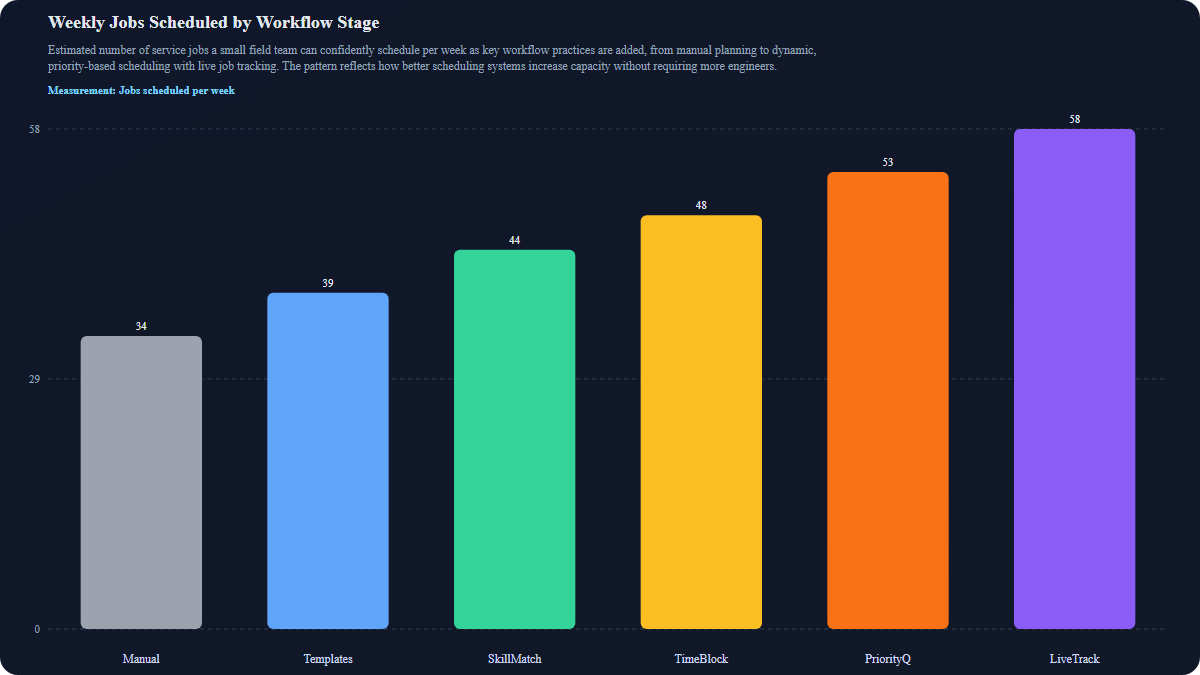
What better scheduling habits look like in the real world
Better scheduling habits are usually small, boring things done consistently, not some magical whiteboard masterpiece. Start by building buffers between jobs so one late arrival doesn’t wreck the whole day. Before dispatch, confirm job readiness: materials available, site access sorted, customer informed, and the right crew assigned. Standardising job notes also helps everyone work from the same playbook instead of decoding mystery updates like “call Steve???” at 4:47 pm. Then review tomorrow’s schedule today, while there’s still time to fix clashes, gaps, or missing info. This is where good job scheduling software earns its keep. When quotes, jobs, calendars, crews, and field updates live in one place, office staff and mobile teams can stay aligned without a constant relay of phone calls. The right job tracking software also makes it easier to spot warning signs early: repeat visits, overtime, idle gaps, late arrivals, and admin lag. Improve those signals, and you usually get the outcomes every trade business wants: more jobs completed, less burnout, and better customer communication.
When it’s time to move beyond spreadsheets and whiteboards
You can get surprisingly far with spreadsheets, whiteboards, and a bit of organised chaos. But there’s usually a point where the cracks stop being “manageable” and start costing time, money, and patience. If your team is growing, jobs are overlapping, and the office is constantly chasing technicians for updates, your system is probably working harder than it should be. Common tipping points are easy to spot: double-booked crews, missed schedule changes, unclear job status, and no simple way to see who’s doing what, where, and when. For businesses handling multiple moving jobs at once, manual planning quickly becomes risky. It also makes it harder to prioritise jobs when urgent callouts, delays, and reschedules all hit at once. Modern job tracking software gives you a clearer way to stay in control. Instead of relying on memory, phone calls, and marker pens that mysteriously vanish, you get live schedules, team visibility, and a central place to manage work from quote to completion. For job scheduling for small teams or larger crews, it’s a much simpler way to keep everything on track.
Growing capacity doesn’t usually mean pushing engineers to work faster, longer, or with one eye twitching by Friday. More often, it comes down to building better systems around them. When trade businesses know how to prioritise jobs, reduce wasted travel and admin, and give both office staff and field crews a clear view of what’s happening, they create room to take on more work without burning people out. That’s where strong processes and the right job tracking software make a real difference. Better scheduling isn’t just about filling diary slots—it’s about matching the right person to the right job at the right time, then adjusting quickly when the day inevitably goes sideways. For businesses handling multiple callouts, projects, and reactive work, practical multi-job scheduling tips and simple tools can remove a huge amount of friction. For small and growing teams, the goal is control without micromanagement. With smarter job scheduling for small teams, better visibility, and fewer communication gaps, more jobs can get done—and your crew can stay sane while doing them.
You might also like
What's the Difference Between Contractor and Subcontractor? Trade Guide
Contractors manage entire projects while subcontractors handle specialist tasks. See the key differences, CIS rules, and risks in the UK tra...
 Tom Campton
• 19 min read
Tom Campton
• 19 min read
Free Job Management Software for 3 Users: The Smart Way to Run a Small Team
Start free job management software for 3 users. Schedule jobs, track work, and send invoices in one simple system built for small field serv...
 Martin Beardmore
• 11 min read
Martin Beardmore
• 11 min read
What is the Average Apprentice Wage for the Trades?
Not sure what to pay your apprentice? Get the 2025 minimum wage rates, industry averages, and tips to structure pay that retains talent and...
Martin Beardmore
• 14 min read