If your team is small but the chaos is not, a three-user setup can be a surprisingly solid fix. Instead of bouncing between phone calls, text threads, paper job sheets, and “who was meant to do that?” moments, you can get your office and field crew working from the same system straight away.
For many trade businesses, that’s enough to cover the key players: one person scheduling jobs and two out on site completing the work. Jobs can be booked in, updates can be logged in real time, photos can be attached, and everyone can see what’s happening without chasing each other all day. Less back-and-forth, less admin, fewer headaches.
A free plan for 3 users is a simple way to test a better workflow without turning your workday into a software project. If you just need more control, better visibility, and fewer missed details, starting small can still make a big difference.
Why a 3-user free plan works for small field service teams
For a lot of small trade businesses, three users is the sweet spot. It often looks like an owner-operator, one office admin, and a lead tech—or two field staff and one person keeping the schedule from going off the rails. At that size, you do not need clunky enterprise software with fifty tabs and a full-time trainer. You need practical control over the day-to-day stuff that actually keeps jobs moving.
That is why we offer a free setup for small teams it makes sense when it covers the whole job flow, not just one slice of it. Quoting is great. Scheduling is great. Invoicing is great. But if they all live in different places, your team ends up double handling admin, chasing missed updates, and guessing who is meant to be where.
For UK field service teams, the real win is mobile-friendly software with live visibility, clear schedules, and fast invoicing. Simple rollout matters too—because no one in plumbing, HVAC, cleaning, or construction has time for a six-week setup saga.
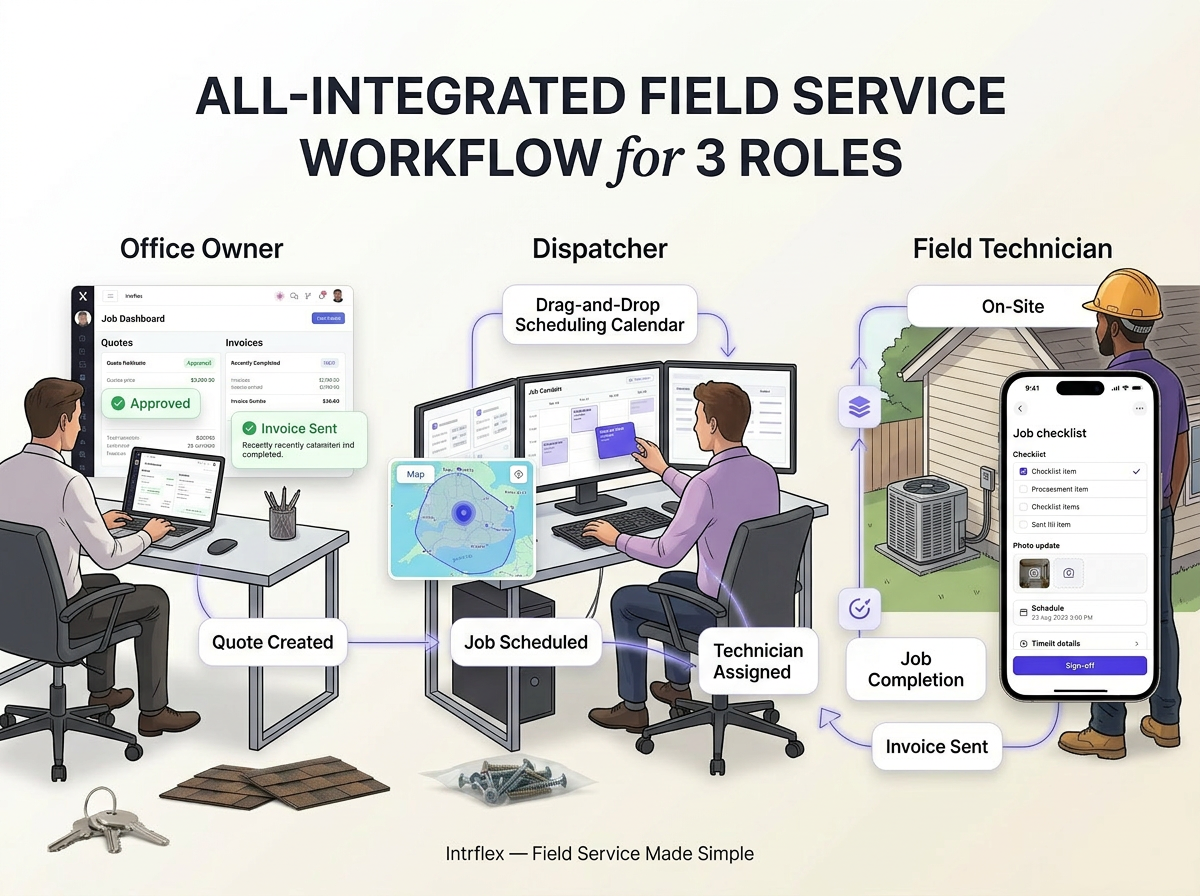
What small teams usually need first
- Get your schedule into one shared calendar so everyone can see what’s booked, what’s next, and who’s on it.
- Keep quotes, invoices, and customer details together to cut the back-and-forth and speed up admin.
- Give crews a simple way to send site updates with photos, notes, and sign-offs before they leave the job.
- Track timesheets and day-to-day team activity without chasing paper or constant check-ins.
- Start with the basics that save the most time first, then add more tools as the team grows.
- Use one app for office and field work so nothing gets lost between calls, texts, and sticky notes.
- Make it easy for a small crew to stay organised from quote to completion—even if you’re only a few users in.
What to look for in free job management software before you commit
| What to check | Free but limited tools | Usable 3-user option |
| Scheduling | Basic calendar or single-user dispatch | Shared calendar, drag-and-drop jobs, crew visibility |
| CRM, quotes and invoices | Contacts only or quote cap | Customer history, fast quoting, invoices that keep cash moving |
| Field updates and timesheets | No mobile workflow or patchy logging | Photos, notes, sign-offs, time tracking for day-to-day jobs |
| Assets, fleet and setup | No vehicle or asset support, clunky onboarding | GPS check-ins or service intervals, easy setup for small teams |
| Best fit | Fine for testing features | Better for small trade teams that need real work done |
Benefits of starting with a free 3-seat on Intrflex
- Keep quotes, jobs, field updates, and invoices in one place so less time gets lost to admin.
- Give office staff and crews real-time visibility, so everyone stays on the same page without the back-and-forth.
- Make scheduling easier to follow with a shared view of who’s doing what, where, and when.
- Start small with a free 3-seat setup to test the system without a big commitment.
- Build consistent workflows early, even if your team is just a few people and a couple of utes.
- Reduce phone chasing and micromanaging by letting updates come through as work happens.
- Respond faster to customers with shared job info, clear status updates, and fewer communication gaps.
- Set your team up to scale smoothly once the trial works and more crew members come on board.
Areas
| Feature area | Why it matters for small trade teams | Minimum acceptable free-plan capability | Nice-to-have upgrade path as the team grows |
| Job scheduling and calendar | Keeps jobs moving without the office playing phone tag all day | Shared calendar, basic scheduling, usable for up to 3 users | Drag-and-drop scheduling, crew views, recurring jobs, smarter dispatch |
| Quotes and invoicing | Helps win work faster and get paid without admin headaches | Create quotes, send invoices, track status in one place | Approval flows, deposit handling, price books, accounting sync |
| Field updates and job notes | Gives the office real-time visibility so nothing gets lost in the van | Mobile notes, photos, task lists, simple sign-off | Live job updates, custom forms, site checklists, customer notifications |
| Timesheets and team tracking | Cuts payroll guesswork and shows who's on what job | Basic time logging, leave entries, simple staff activity view | Job costing, performance tracking, GPS check-ins, overtime rules |
| CRM and asset management | Keeps customer details and gear history tidy as the workload grows | Contact records, job history, basic equipment list | Service intervals, fleet tracking, maintenance reminders, deeper reporting |
Best team setups for a 3-user plan
A 3-user setup works best when each person owns a clear part of the job flow. One of the strongest combos is owner, admin, and field lead. The owner keeps an eye on quotes, performance, and the bigger picture, the admin handles scheduling and paperwork, and the field lead keeps jobs moving on site without the usual back-and-forth chaos.
Another smart setup is a dispatcher with two mobile techs. This is ideal for service businesses that need quick turnaround and tight communication. The dispatcher can assign work, update customers, and reshuffle the day when things go sideways, while the techs focus on getting the job done and sending live updates from the field.
It also suits a small trade start-up that wants to test software before rolling it out across the whole team. If you are trying to keep costs down, a plan that is free for 3 users can be a simple way to trial job scheduling, team coordination, and field updates before going all in.
See how Intrflex fits your workflow
Book a guided demo to see quoting, scheduling, and field updates in one place.
For plenty of small trade businesses, three users is more than enough to get organised without paying for bells and whistles you do not need yet. If your setup is a couple of people on the tools and someone keeping the office from catching fire, a plan that is free for 3 users can be a smart starting point. The trick is choosing software that does real work, not just a shiny dashboard.
Look for a system that helps you manage the full job cycle: quotes, scheduling, crew updates, photos, sign-offs, invoicing, and everything in between. That is where the real admin savings happen, and where fewer phone calls, missed details, and “who was meant to do that?” moments start to disappear.
Start with a free plan that supports how your team actually works day to day. Then, when the jobs pile up, the crew grows, or the calendar gets chaotic, you can scale up with confidence instead of switching systems mid-mess.
You might also like
How to Estimate Building Materials For Trade Jobs
Struggling with waste or missed margins? See how to estimate building materials accurately for every trade job so you never overorder or com...
 Tom Campton
• 24 min read
Tom Campton
• 24 min read
What's the Difference Between Contractor and Subcontractor? Trade Guide
Contractors manage entire projects while subcontractors handle specialist tasks. See the key differences, CIS rules, and risks in the UK tra...
Tom Campton
• 19 min read
How to Run More Jobs With Fewer Engineers (Without Burning Them Out)
Struggling to keep up with demand? Discover how to schedule more jobs, reduce wasted time, and boost productivity without overloading your e...
 Martin Beardmore
• 10 min read
Martin Beardmore
• 10 min read