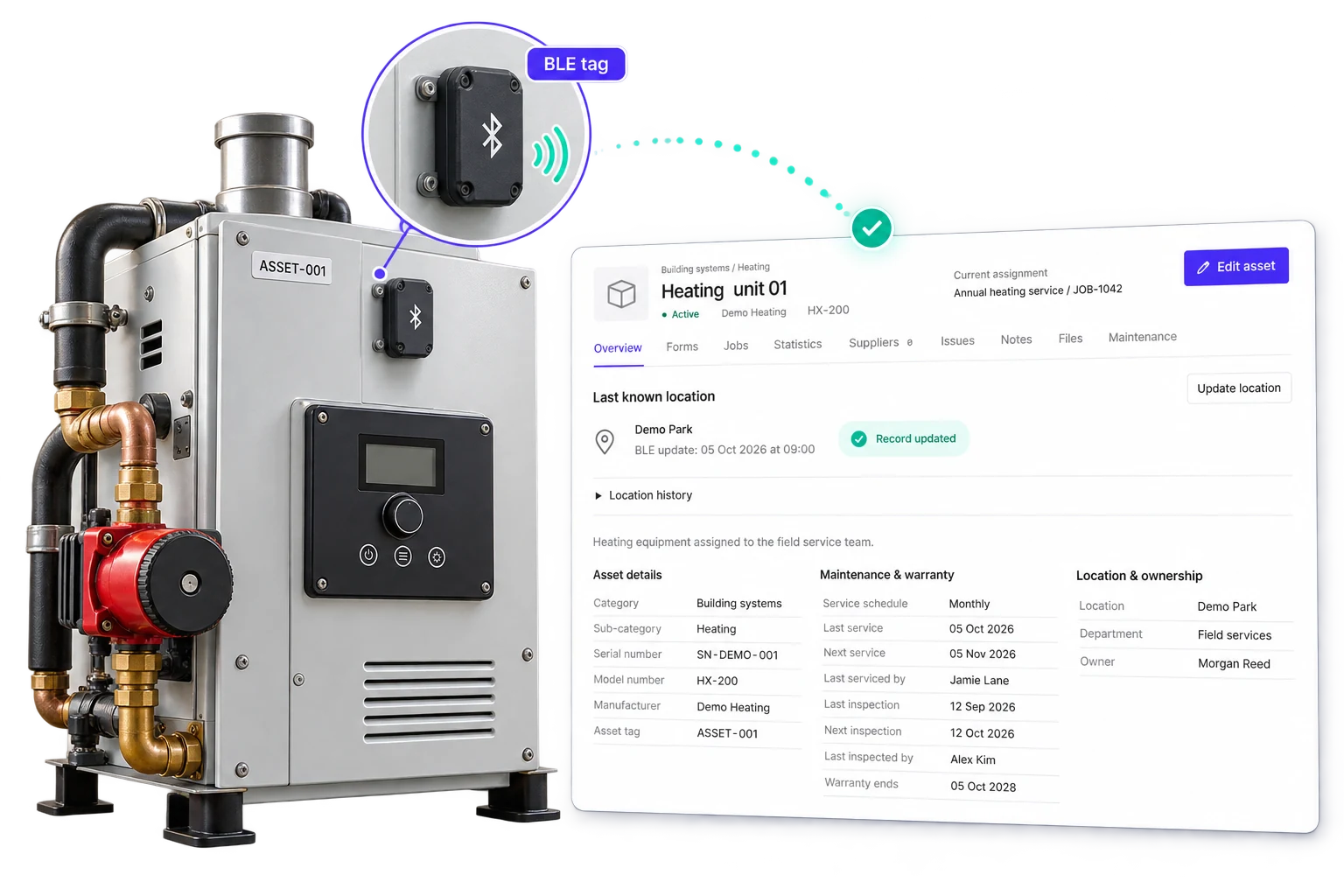
Replace scattered equipment lists with a record your whole operation can trust.
Intrflex brings asset identity, ownership, service history, paperwork, and job usage together. The office can plan with confidence, field teams can identify the right equipment quickly, and managers can see how assets support profitable work.
Find the right record quickly
Search by name, tag, serial number, category, status, classification, or location, then use QR labels to identify equipment in the field.
Keep maintenance visible
Store schedules, service dates, warranty cover, condition, issues, evidence, and maintenance records where they will not be missed.
Connect equipment to delivery
Assign assets to jobs and see their site, status, role, duration, and history alongside the operational and financial story of the work.
Everything needed to manage an asset through its working life.
One structured record replaces disconnected spreadsheets, folders, labels, and maintenance reminders.
Identification that stays unique
Store asset tags, serial numbers, model numbers, SKU, brand, category, and a clear description so similar equipment is never confused.
Ownership and location
Separate internal and client assets, then record the location, department, image, and supplier responsible for each item.
Search and QR labels
Filter large registers by the details your team knows, and export QR labels for faster identification on site.
Maintenance and condition
Track last and next maintenance dates, service frequency, condition ratings, issues, and detailed maintenance records.
Files, notes, and warranty
Keep manuals, photos, certificates, notes, warranty dates, and provider details attached to the asset they describe.
Jobs and utilisation
Review every linked job, the asset assignment type, time on site, completion history, and usage grouped by job type.
Asset details
Everything the team needs, held against one record
Identification
Atlas hydraulic press
AST-0048 · HP-29418 · Atlas HP400
Ownership
Internal asset
Plant department · North depot
Financial record
£18,500 purchase value
Straight-line · 8-year life
Service readiness
Active · Very good
Maintenance due 12 September
Give each asset a complete operational passport.
Open one record and understand what the asset is, where it belongs, what it is worth, who supplies it, and whether it is ready for work.
- 1 Record purchase price, acquisition date, useful life, depreciation rate, and depreciation method.
- 2 See current value alongside the asset condition, maintenance schedule, and warranty cover.
- 3 Link suppliers and keep notes, files, issues, photos, and maintenance evidence together.
- 4 Keep company equipment and customer assets distinct with internal and client classifications.
Know where it is, who supports it, and every service completed.
Bring the practical details together before a visit is booked or an engineer arrives. The asset record keeps its live tracked location, supplier contacts, and service history in the same view.
- 1 Track the asset live. See its latest reported position on the map, when the location was last updated, and where equipment is moving between sites.
- 2 Reach the right supplier. Keep the company, account reference, contact name, email, phone number, and address close to the asset.
- 3 Review its service history. Follow maintenance, repair, inspection, and calibration records with dates, outcomes, notes, actions, and evidence.
Atlas hydraulic press
AST-0048 · Live asset tracking
Current position · Riverside Apartments
14 Riverside Walk, London, SE1 2AB
Linked supplier
Atlas Industrial Services
Service contact
Maya Thompson
Account
AIS-10492
service@atlas.example
Phone
020 7946 0182
Service history
8 records · Next due 12 Sep
18 June · Completed
Quarterly maintenance
Hydraulic lines inspected, oil replaced, and pressure tested.
2 notes · 3 files
02 April · Action logged
Safety inspection
Guard wear noted. Replacement fitted during the next visit.
Inspection certificate attached
11 January · Completed
Calibration
Pressure gauge calibrated and verified within tolerance.
See every job the asset supports, without rebuilding the story later.
Asset assignments connect the register to live delivery. Mark the equipment that defines the job as core, add supporting assets when needed, and keep a usable history after the work closes.
- 1 See the current active job and site directly from the asset record.
- 2 Review job reference, type, location, dates, duration, status, and assignment type.
- 3 Measure total jobs, completed work, scheduled time, site time, and first and latest visits.
- 4 Group usage by job type to understand where an asset spends its working life.
Job usage
38 jobs · 34 completed · 126 hours on site
J-4821 · Plant room repair
Riverside Apartments · 6h 30m
Active
J-4764 · Planned maintenance
North depot · 3h 15m
Complete
J-4618 · Pump replacement
Cedar Works · 8h
Complete
Understand asset usage and job cost in the same operational picture.
The asset record tells you which equipment supported the job and how it was used. Job costings then show where the money went, so managers can review delivery and margin with the right context.
Asset purchase value and depreciation stay on the asset record. They are not automatically added to the job costing total.
Job J-4821 costings
Plant room repair · Atlas press assigned
Useful to everyone responsible for equipment and work.
Each team gets the detail it needs without maintaining another version of the asset register.
Office and operations
Find equipment, check availability and status, understand the current assignment, and answer asset questions without calling the field.
Field teams
Identify the right asset, open its record, review history, and attach job usage and evidence while the details are still fresh.
Service managers
Plan maintenance, monitor condition and warranty cover, review issues, and keep service records complete.
Business owners
Understand utilisation, asset value, job activity, and the labour, materials, travel, purchasing, revenue, and profit behind delivery.
See how Intrflex can bring your assets and jobs together
Book a tailored walkthrough and we will show you how to build a reliable asset register, manage maintenance, connect equipment to jobs, and review job costs with the right operational context.
Book your asset management demo
Tell us how you track equipment today and we will focus the demo on the assets, maintenance, and job workflows your team needs.
After you submit, we arrange your demo and walk through your workflow. We agree setup and training with you based on your team and data.
What the demo includes
- Your current workflow: We start with how your team handles jobs, updates, and paperwork today.
- Live walkthrough: We show how scheduling, field updates, and job records work together in one system.
- Questions answered: We cover the parts of Intrflex that matter to your process, team size, and pain points.
- Next steps: You leave with a clear view of fit, rollout expectations, and what onboarding looks like.
Common questions about Intrflex Asset Management
Straight answers about tracking equipment, maintenance, job usage, and costs.
What can I record against an asset? + -
You can keep the asset name, tag, serial and model numbers, category, classification, location, department, supplier, purchase details, depreciation settings, maintenance schedule, condition, warranty, files, notes, and issues together in one record.
Can I manage both company-owned and customer assets? + -
Yes. Assets can be classified as internal or client assets, so your own tools and equipment can sit alongside the customer equipment your team installs, services, or maintains without mixing their purpose.
How do assets connect to jobs? + -
Your team can assign assets to a job as core or supporting assets. The asset record then keeps its job history, including job type, site, dates, duration, status, and assignment type.
Does Intrflex show how often an asset is used? + -
Yes. Each asset has job and utilisation statistics, including total and completed jobs, core and normal assignments, scheduled time, site time, first visit, latest visit, and jobs grouped by type.
Can I track maintenance and warranty information? + -
Yes. Record maintenance dates and schedules, create maintenance records with notes and files, log issues, monitor condition, and keep warranty dates and provider details with the asset.
How do assets relate to job costings? + -
Asset assignments show which equipment supported the work. The job costing view separately brings together labour, stock, vehicle mileage and fuel, accommodation, purchase orders, additional costs, revenue, and profit, giving managers the operational and financial context for the same job.
Can asset labels be scanned in the field? + -
Yes. You can export QR labels for assets, helping the team identify equipment and open the right record without relying on names or handwritten references.