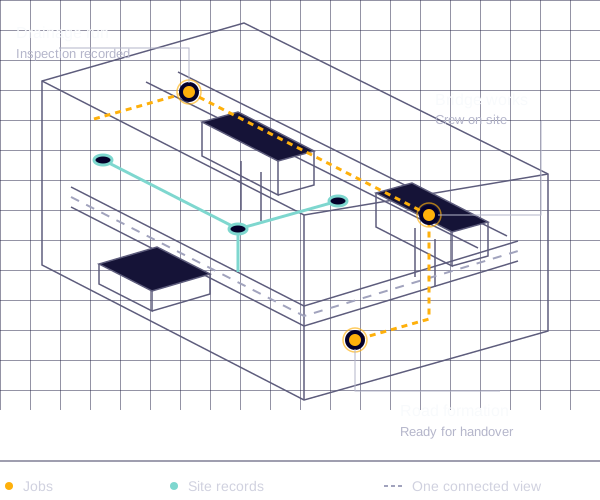
Every site.
Every job.
A clearer picture.
A drainage crew on one section. A highways team on the next. See who is assigned, how work is progressing and which forms still need completing, without chasing updates across phone calls and spreadsheets.
- Plan jobs, assign teams and track progress across sites.
- Keep drawings, photos, notes and documents with the work.
- Make key forms required before a job can be completed.
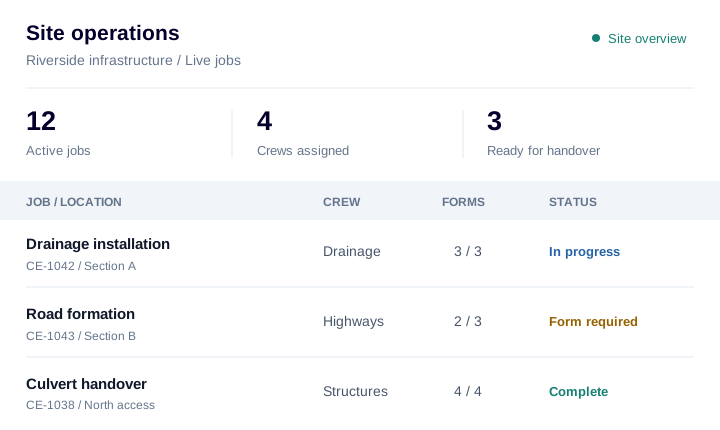
The paperwork your sites run on.
From the permit to dig to the final handover pack, keep the records your team and clients rely on connected to the job. Bring your existing documents and configure digital forms around the checks you actually carry out.
Health, safety and CDMRAMS, site briefings and the project safety record
- Risk assessments and method statements (RAMS)
- Construction phase plans and pre-construction information
- CDM health and safety file contributions
- COSHH assessments and safety data sheets
- Site inductions and toolbox talk attendance
- Daily briefings and point-of-work risk assessments
- Accident, incident and near-miss records
- RIDDOR supporting records, where reportable
- Emergency arrangements and rescue plans
- Training, competence and operator authorisation records
LOLER, PUWER and plantLifting equipment, machinery and inspection evidence
- LOLER reports of thorough examination
- Lifting accessory registers and examination reports
- Lift plans and lifting operation briefings
- PUWER inspection records and equipment assessments
- Plant pre-use checks and defect reports
- Maintenance, servicing and repair records
- Hire documents and declarations of conformity
- Calibration and equipment test records
Permits and temporary worksExcavations, buried services and controlled activities
- Permits to dig and underground service records
- Utility drawings and service detection surveys
- Excavation inspections and remedial action records
- Confined space permits and entry logs
- Hot work permits and fire watch records
- Temporary works designs, registers and design checks
- Permits to load, strike or dismantle temporary works
- Scaffold and work-at-height inspection reports
Quality, inspections and testingProof of the work, from formation to final test
- Inspection and test plans (ITPs)
- Hold-point and witness-point records
- Concrete pour records and cube test results
- Compaction, CBR and plate load test results
- Drainage CCTV surveys and pressure or leakage tests
- Material approvals and delivery records
- Setting-out checks and survey records
- Non-conformance reports and corrective actions
Site delivery and commercialThe daily record behind progress and payment
- Site diaries, progress reports and dated photographs
- Labour, plant and subcontractor records
- Drawings, specifications and requests for information (RFIs)
- Delivery tickets and waste collection records
- Quotes, purchase orders and subcontractor instructions
- Variations and supporting measurements
- Applications for payment and invoices
- Snagging lists and defect close-out evidence
Environmental and highwaysRecords for the site, its neighbours and the network
- Environmental management plans and site checks
- Waste transfer and hazardous waste consignment notes
- Dust, noise and vibration monitoring records
- Spill response and pollution incident records
- Dewatering permits and discharge consents
- Traffic management plans and inspection records
- Street works permits, notices and reinstatement records
- Ecology surveys and relevant consents
Completion and handoverA clear record of what was built and signed off
- Works completion certificates and client sign-off
- As-built drawings and survey information
- Operation and maintenance (O&M) manuals
- Asset schedules, warranties and product information
- Final test results and inspection records
- Handover packs and health and safety file information
- Adoption and sectional completion records
- Outstanding defects and follow-up actions
Examples to adapt to your work, contract and site requirements. Your team determines the records, checks and approvals needed. For statutory record requirements, see HSE guidance on LOLER thorough examination reports, PUWER equipment inspections and construction health and safety records.
Finish the work.
Let the paperwork follow.
A completed job or submitted form can start the next step automatically. Configure the trigger, check the information your process needs, generate the PDF and send it to the right people.
Explore workflow automation ↗A failed check should
start the fix.
Give every recorded issue a next step, an owner and a route back to sign-off. Keep completion certificates on hold until the approval conditions in your workflow are met.
A problem is recorded. It has somewhere to go.
The drainage inspection records a misaligned pipe joint. The submitted result starts the failure branch of your configured workflow.
Result: fail · Photo and site reference attached
Supervisor approval has not been recorded.
CE-1042 · Awaiting recorded supervisor approval
Illustrative example of configured workflows. Your team carries out the corrective work and reinspection, and records the approval. Intrflex acts on those recorded results and the conditions you set.

Capture it on site.
Carry it through to handover.
Build forms for daily checks, inspections and completion sign-off. Your field team can add measurements, files and signatures in the Intrflex mobile app, with submissions connected to the job they were assigned to.
Use that information in the documents you issue. Generate branded certificates and reports through configured workflows, and keep supporting drawings, test results and O&M information together for handover.
For LOLER and other statutory inspections, retain the competent person's report and required particulars. Document automation supports your process; the examination, technical judgement and approval remain with the responsible people.
Explore forms for site teams ↗A few practical questions.
Who is Intrflex civil engineering software for?
Civil engineering contractors and site teams delivering groundworks, drainage, highways, utilities, structures and infrastructure maintenance. Keep job planning, site forms, plant documents and completion records connected across the office and the field.
Can we use our own forms and certificate templates?
Yes. Build forms around your existing checks, with fields for job details, measurements, files and signatures. Use document templates for branded PDF outputs. The documents listed here are examples you can manage or configure, rather than a supplied library of approved statutory forms.
Can a job require forms before it is completed?
Yes. Assign required forms to a job to prevent completion until those forms have been submitted. This helps collect the inspection, evidence or sign-off your process needs. Submission alone does not confirm the work is safe or the answers have been approved.
Can certificates be created and sent automatically?
Yes. Configure workflows to start when a job is completed or a form is submitted, create a PDF from a submission or document template, and email it to the recipients you select. Where approval is needed, record it in your process and check it in the workflow before issuing the document.
Can we manage LOLER and PUWER records?
Store examination reports, inspection records and plant documents alongside the relevant work. Configure forms to collect inspection information. LOLER thorough examinations must be carried out by a competent person and their reports must contain the required particulars. A generated PDF or completed checklist does not replace that examination or certify legal compliance.
Bring a form.
Bring a workflow.
See how it connects.
Book a free 20-minute demo. We will walk through your jobs, site records and the steps between completing the work and sending the paperwork.
Show us the checks and certificates your team uses today. We will explore how forms, document templates and automations can fit your process.