Quoting and invoicing should never take longer than the job.
From the first estimate to the final invoice, keep customer details, quote decisions, and payments together instead of chasing separate spreadsheets.
Keep accepted work moving with job management and record labour hours with time tracking for field teams.
Sales, ops, and finance stay aligned.
Everyone works from the same quote and invoice record.
Follow up on quotes
Reuse branded templates and configure follow-ups for unanswered quotes.
- • Template library
- • Quote status
- • Client history
Keep jobs moving
Turn accepted quotes into jobs, then set visit dates and assign the crew.
- • Scope clarity
- • Job handoff
- • Document trail
Get paid cleanly
Keep deposits, payment stages, and outstanding balances with one invoice.
- • Invoice status
- • Payment reminders
- • Audit-ready exports
Move from manual documents to one connected sales process.
See what changes when quoting and invoicing live alongside the customer and job record.
Without Intrflex
- - Quotes rebuilt in spreadsheets for every change.
- - Manual follow-ups with no clear status.
- - Invoicing detached from the job history.
With Intrflex
- + Templates auto-fill client and job details.
- + Live status for quotes, approvals, and invoices.
- + Every document stays tied to the job record.
Create, send, track, and collect in one place.
A connected workflow keeps every customer-facing document consistent from the first quote to the final payment.
Create
Build branded quotes and invoices from reusable templates.
Send
Share a secure customer page and professional PDF.
Track
Follow views, decisions, payment stages, and reminders.
Reconcile
Keep payments, deductions, and accounting records aligned.
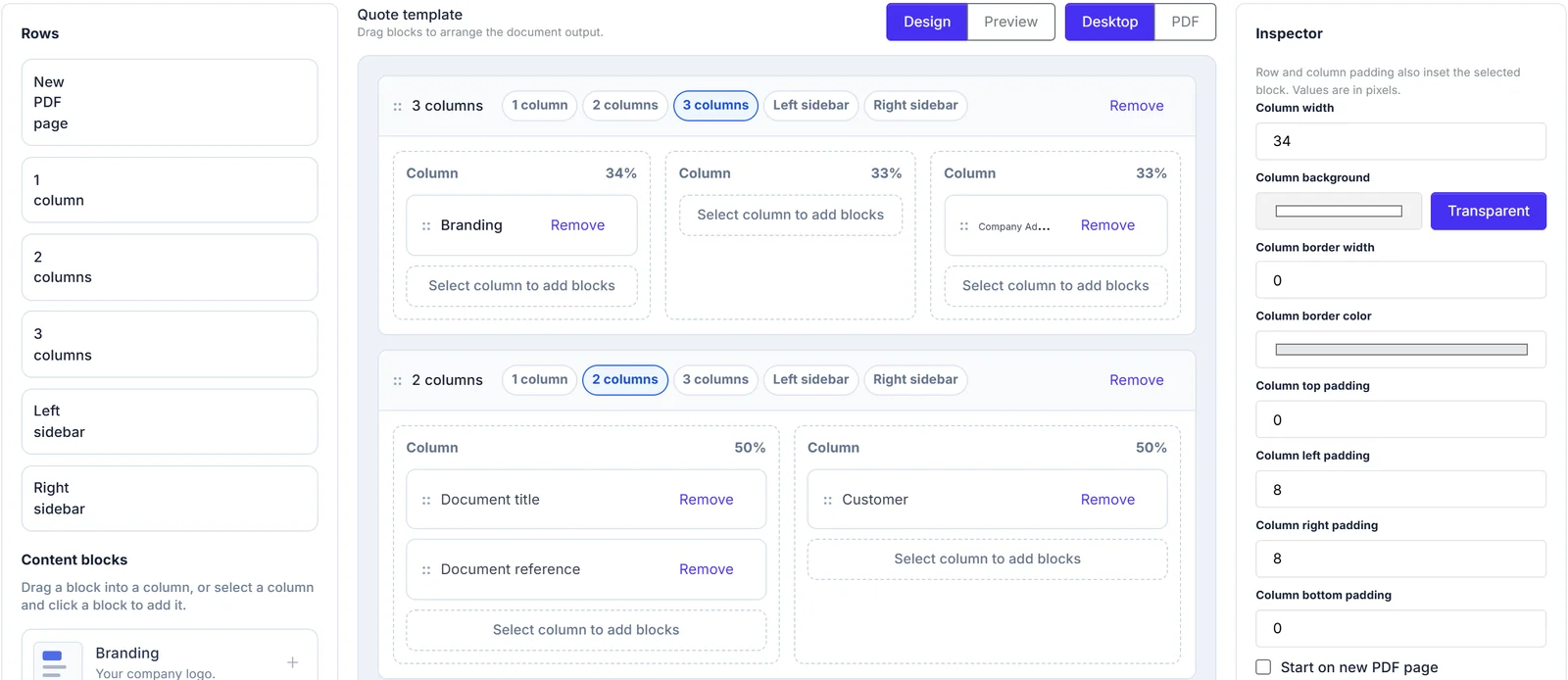
Build quotes and invoices that look like your business.
Create reusable quote and invoice templates with your own structure, branding, colours, terms, payment details, and page layout. The same design powers the browser view, downloaded PDF, and email attachment.
- 1 Arrange document blocks, columns, dividers, tables, totals, and payment schedules with drag and drop controls.
- 2 Preview desktop and PDF layouts while you design, using realistic document data.
- 3 Set a company-wide default or choose a different template for an individual quote or invoice.
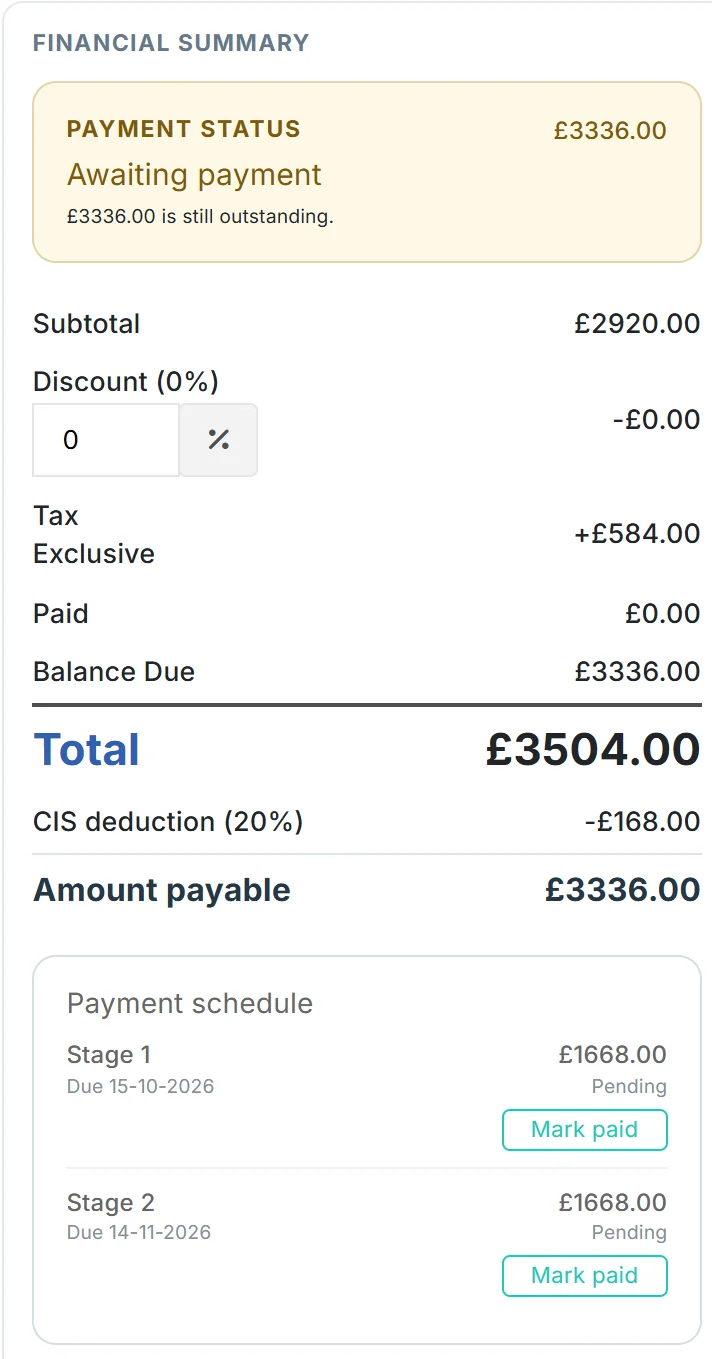
Staged payments and CIS deductions on one invoice.
Agree a payment schedule and apply CIS without splitting the document. One invoice, one PDF, one customer link, and one complete payment history.
- 1 Add payment stages with due dates and amounts that sum to the invoice total.
- 2 Clients pay each stage through Stripe or PayPal, or mark a stage paid for bank transfers.
- 3 Apply 0%, 20%, or 30% CIS to labour lines while materials stay untouched.
- 4 Show tax, CIS deduction, and the final amount payable on the invoice and PDF.
Quote QT-1048
Quote sent
09:12Secure customer link and branded PDF delivered.
Viewed by customer
09:47The public document view was opened.
Quote accepted
10:03Terms acknowledged and deposit unlocked.
Deposit paid
10:08Payment reminder in 3 days
ScheduledGive customers one clear route to approve and pay.
Every quote and invoice can open on a secure, branded customer page. Customers can review the document, accept or decline a quote, download the PDF, and pay online without an account.
- 1 See when a customer first views a quote and capture their acceptance or decline feedback.
- 2 Take staged or full payments through Stripe and PayPal, or record an offline bank payment.
- 3 Schedule automatic quote follow-ups and overdue invoice reminders with the latest PDF attached.
Price the job and chase it from site.
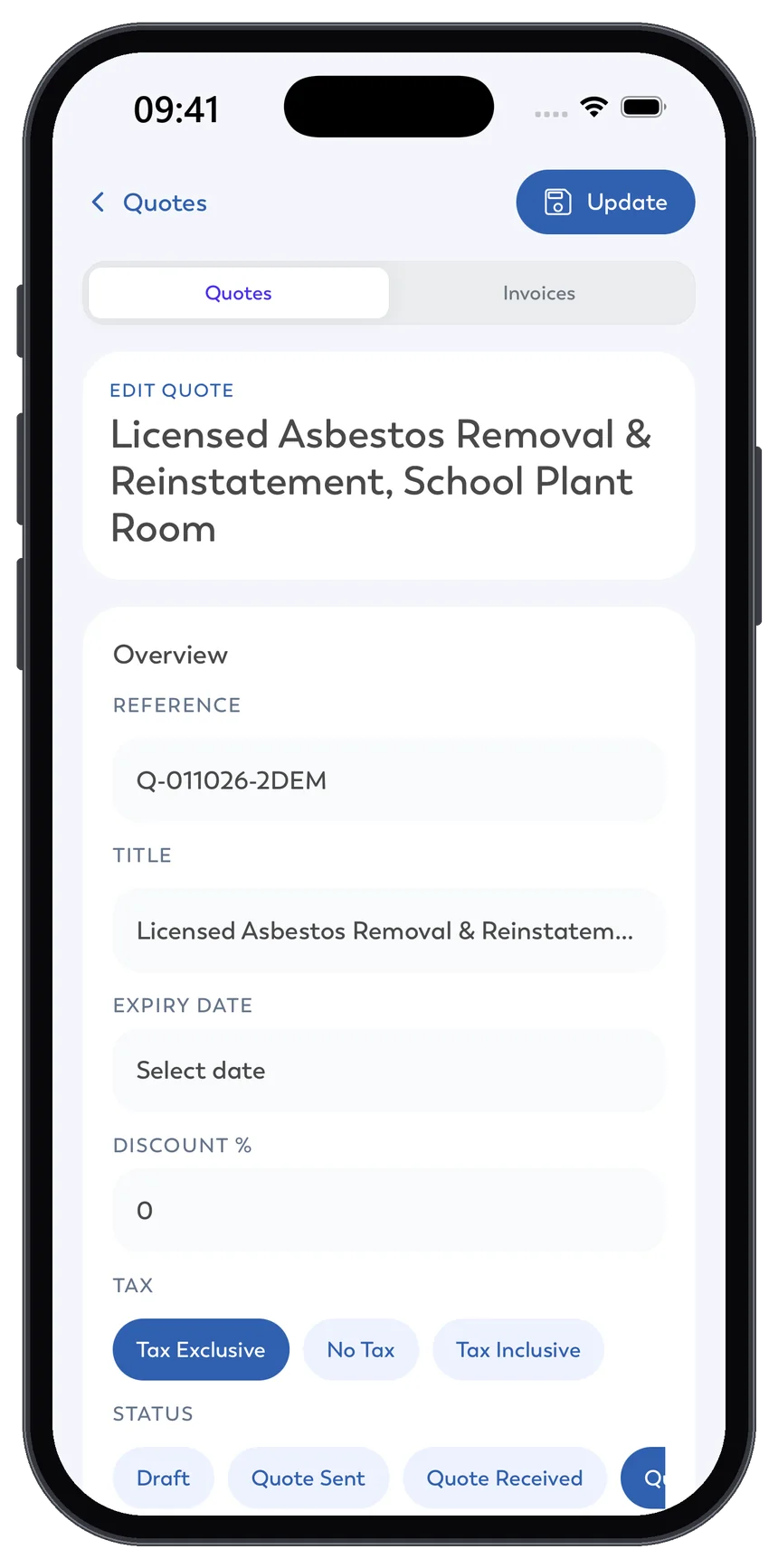
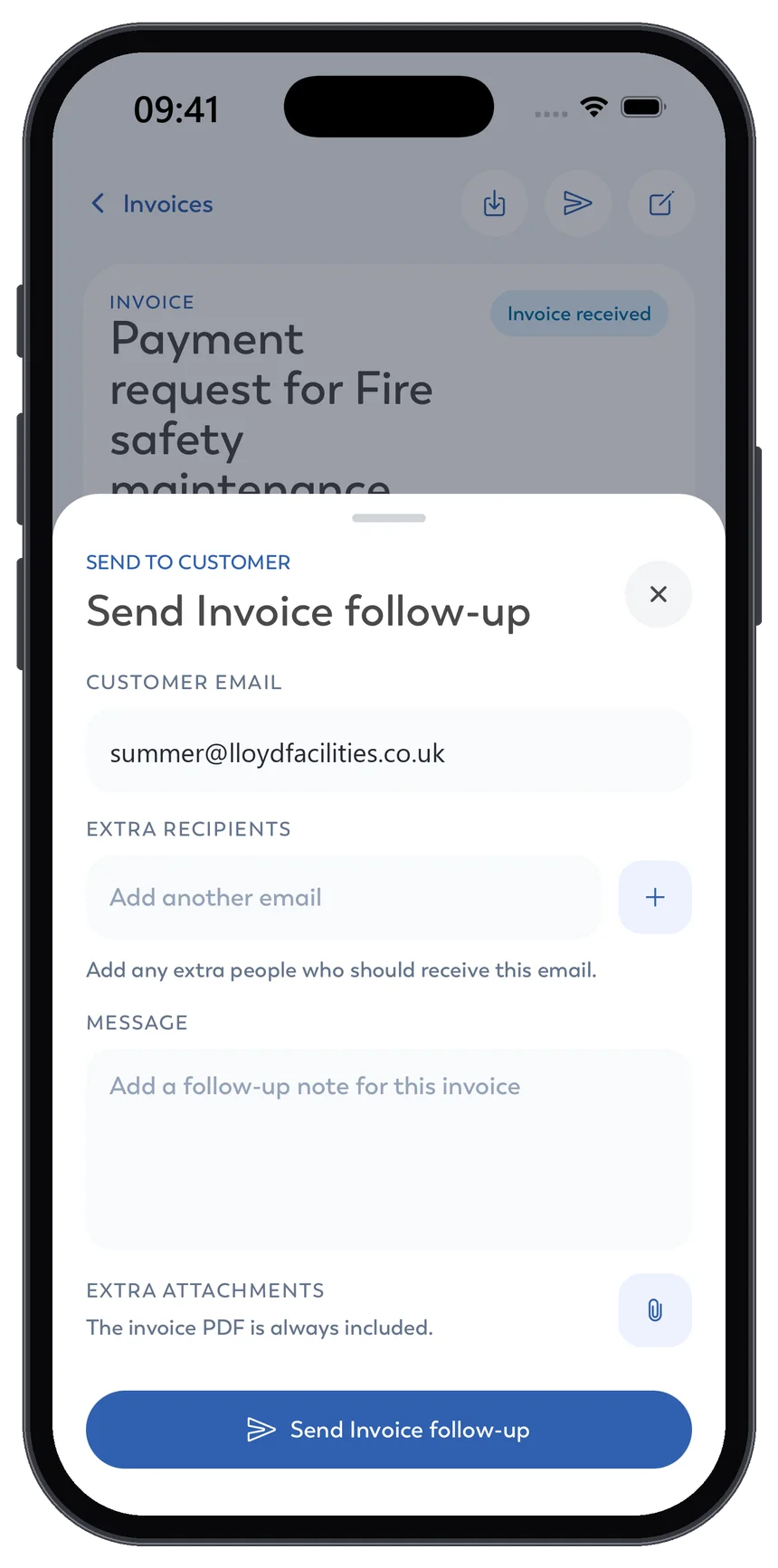
The Intrflex mobile app carries the same quotes and invoices as the office. Update pricing while you are still with the customer, then send or follow up without going back to a desk.
- 1 Edit quote details, tax, status, and pricing lines on your phone.
- 2 See which quotes have been seen, accepted, or need a follow-up.
- 3 Send invoice follow-ups with the latest PDF attached automatically.
Keep quotes and payments in sync.
Integrate invoicing with the tools your team already relies on.
QuickBooks
AccountingExport invoices to QuickBooks for accounting.
Xero
AccountingSync invoices and payments with Xero.
Stripe
PaymentsTake online card payments on eligible documents.
PayPal
PaymentsAccept PayPal payments and track them in Intrflex.
Follow each quote through to payment.
Review quote decisions, invoice balances, and reminders from the document record.
Quote decisions
Online
Accept or decline
Document design
Templates
Reusable branding
Payment follow-ups
Reminders
Configured schedules
Invoice balances
Stages
Amounts and due dates
Connected quoting and invoicing workflows
Protect every document.
Keep quotes, invoices, and payment history secure without slowing teams down.
Granular permissions
Control who can view, edit, or export documents.
Automatic backups
Quotes and invoices are protected by routine backups.
Secure file storage
Attached files stay protected with access controls.
Activity visibility
Track updates and changes for full accountability.
Quoting and invoicing, explained.
Answers to common questions about creating documents, handling CIS, collecting approvals, and getting paid.
Can I customise the design of quotes and invoices? + -
Yes. Build reusable quote and invoice templates with your logo, colours, content blocks, tables, totals, payment details, terms, and page layout. You can preview both the browser and PDF versions before making a template active.
Does Intrflex support CIS deductions? + -
Yes. CIS-enabled invoices can apply 0%, 20%, or 30% deductions to eligible labour while excluding materials. Labour can be identified through accounting codes or selected manually on each line.
What happens when a customer accepts a quote? + -
Customers can accept quotes through a secure link without an account. You can then convert the accepted quote into a job, set visit dates, and assign the crew.
Can an invoice be split into payment stages? + -
Yes. Add named payment stages with their own amounts and due dates while keeping one invoice, one PDF, and one payment history. Customers are guided to the next payable stage.
Which online payment methods are supported? + -
Customers can pay eligible quotes and invoices through Stripe or PayPal. Bank transfers and other offline payments can also be recorded manually against the document or payment stage.
Can Intrflex chase overdue quotes and invoices automatically? + -
Yes. You can configure follow-up schedules for quotes and overdue invoices. Intrflex sends the reminder with the latest PDF attached and keeps the follow-up history tied to the document.
Keep quotes, invoices, and payments connected.
Book a demo to see Intrflex quoting and invoicing in action.